
Your page ranks on page one. Impressions look strong, yet clicks stay flat and engagement drops. The issue isn’t content or backlinks — it’s an intent gap.
You’re answering something users aren’t searching for. With 58.5% of US Google searches ending without clicks, aligning precisely with search intent determines whether you gain traffic or remain invisible.
So, in this guide, I show you how to find, measure, and close intent gaps using two free tools you already have — Google Search Console and GA4.
A search intent gap is the mismatch between what a searcher wants to accomplish and what your page actually delivers. These gaps show up as high impressions with low CTR in Google Search Console, or strong traffic with poor engagement in GA4.
Three common patterns cause most failures:
- wrong page type (a glossary ranking for a "best tools" query),
- missing decision info (no pricing or comparisons on a commercial page),
- or outdated alignment with a SERP that has shifted format.
You can diagnose intent gaps for free using GSC query data filtered by page, GA4 engagement and path exploration reports, and a 5-minute SERP analysis using the Content Type, Content Format, and Content Angle framework.
And, fix them by re-aligning existing pages, creating new intent-specific pages, or simply rewriting metadata to match dominant query language.
What is a Search Intent Gap?
A search intent gap is the distance between what a searcher wants to accomplish and what your page actually helps them do.
You might target the right keyword. But if your page delivers a 3,000-word educational guide while the SERP rewards product comparisons — you've got an intent gap. The keyword matched. The purpose didn't.
Google's Search Quality Rater Guidelines (updated September 2025) evaluate every result on a "Needs Met" scale — from "Fully Meets" to "Fails to Meet."
That scale measures one thing: did the page satisfy the intent behind the query? Pages that miss intent get the lowest scores regardless of how well-written they are.
All SEOs know that intent falls into four categories — informational, navigational, commercial, and transactional. But the gap rarely comes from targeting the wrong category entirely.
It comes from subtle mismatches within a category: answering at the wrong depth, in the wrong format, or for the wrong stage of the decision.
The stakes are higher with AI search. AI Overviews now appear on 25.8% of all searches, and they trigger on informational queries 39.4% of the time.
These AI-generated answers pull from pages that match intent precisely. Vague or misaligned content gets skipped entirely — by both the algorithm and the AI summary layer sitting on top of it.
The 3 Intent Gap Patterns that Actually Hurt Rankings
Most intent gaps fall into three patterns. Recognizing which one you're dealing with determines whether you need a metadata tweak, a content restructure, or a brand-new page.
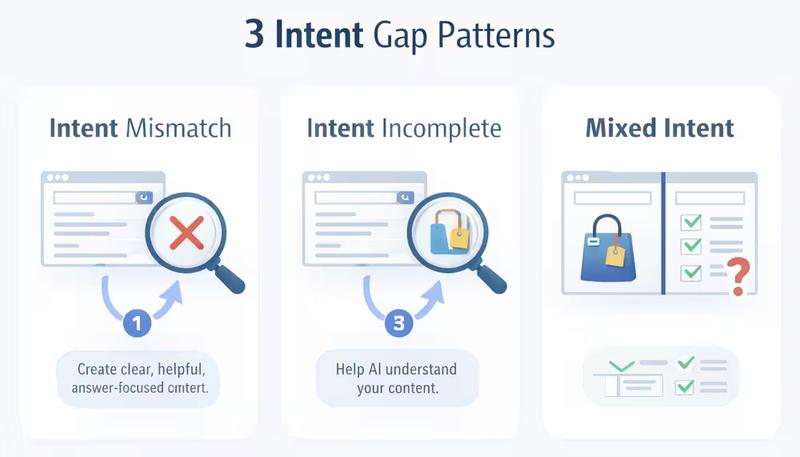
Intent Mismatch — Wrong Page Type Entirely
You target "best project management software" with a page that defines what project management is. The SERP shows listicles with comparison tables, pricing breakdowns, and pros/cons. Your glossary-style page occupies a different intent universe.
This is the most damaging pattern because no amount of on-page optimization fixes a fundamental format mismatch. The page type itself is wrong.
Intent Incomplete — Right Page, Missing the Deciding Info
Your page format matches the SERP — you wrote a "best tools" roundup. But it lacks the elements people use to make decisions: pricing context, use-case breakdowns, screenshots, or selection criteria.
RankSaver’s CTR research across 15+ client websites showed that position #1 CTR dropped 26% year-over-year — from 31% to 22.5%. When every ranking position leaks more clicks than before, the pages that retain traffic are those delivering complete decision support, not partial answers.
This pattern is the easiest to fix. The page structure is already correct — you just need to fill in what's missing.
Mixed Intent — The SERP is Split
Some queries trigger a blended SERP: how-to guides, product pages, and video tutorials. "Email marketing platform" might show comparison articles, a HubSpot landing page, and a YouTube walkthrough — all on page one.
So, how to read it:
| SERP Signal | What It Tells You | Your Move |
|---|---|---|
| 6+ results share the same format | Dominant intent is clear | Match that format or don't compete |
| 3-4 formats split the top 10 | Mixed intent — Google is testing | Serve the dominant intent, acknowledge the secondary one on the same page |
| Featured snippet + product carousel | Informational AND transactional intent coexist | Create separate pages for each intent, linked internally |
| Video results in top 5 | Visual/procedural intent is strong | Add video or step-by-step visuals to your content |
Trying to serve only one angle on a split SERP limits your ceiling. The pages that rank in these scenarios cover the primary intent deeply while nodding to the secondary one — a comparison article that includes a "how to choose" section, for example.
How to Find Intent Gaps in Google Search Console
GSC holds the raw signal: what people searched before they saw your page.
The disconnect between those queries and what your page actually delivers is your intent gap — visible in the data if you know where to look.
Step 1 — Filter by Page and Pull Query Data
Open GSC. Go to Performance → Search Results. Click + Add filter → Page, paste the URL you want to audit, and hit Apply.
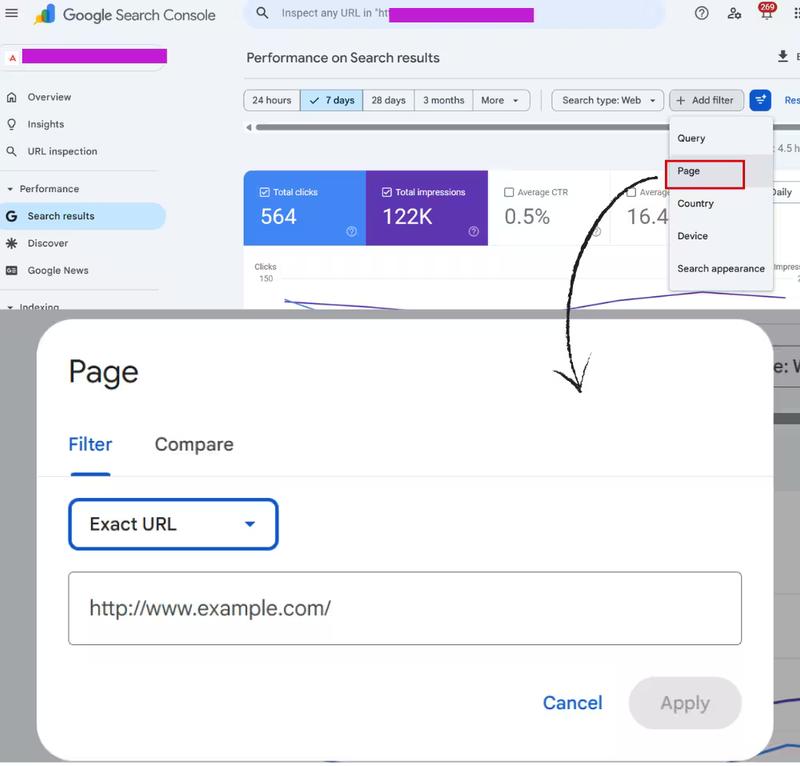
This isolates every query Google associated with that single page. You're no longer looking at site-wide noise — you're seeing exactly what search demand this page is absorbing.
Step 2 — Identify High-Impression, Low-CTR Queries
Enable the CTR and Position columns. Sort by impressions, descending.
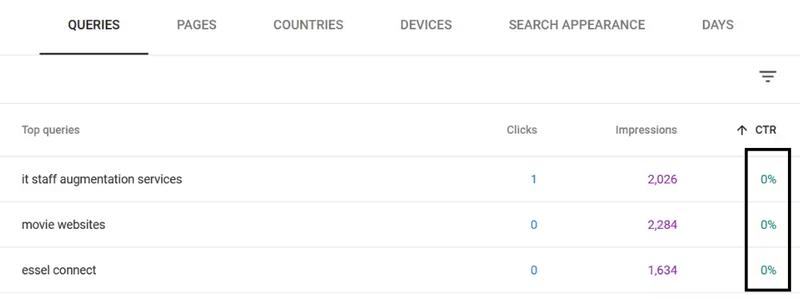
The queries you're looking for have strong impressions but CTR well below your page's average. Google considers your page relevant enough to show — but searchers disagree when they read your title and description in the results.
A page averaging 3.2% CTR with individual queries pulling 0.4%? Those low-CTR queries are where the intent mismatch lives.
Step 3 — Spot the Intent Signal in Query Language
Read the actual queries — not just the volume numbers. Group them by what they're asking for:
| Query Pattern | Likely Intent | Example |
|---|---|---|
| "what is," "meaning of," "how does" | Informational | "what is search intent" |
| "best," "top," "vs," "alternative" | Commercial | "best SEO audit tools 2026" |
| "how to," "step by step," "tutorial" | Procedural | "how to fix crawl errors" |
| "buy," "pricing," "demo," "free trial" | Transactional | "Ahrefs pricing plans" |
| Brand name, product name | Navigational | "Semrush keyword gap tool" |
Now compare those patterns against what your page actually is. If 60% of impressions come from "how to" queries but your page is a product landing page — the gap is confirmed in data.
How to create the annotated view:
Option 1: Quick & Visual
- Open GSC → Performance → Search Results → filter by your target page URL
- Click the Queries tab, enable CTR and Position columns, sort by impressions descending
- Take a full screenshot of the query table showing 8–10 queries
- Open the screenshot in any annotation tool — Snagit, Canva, Google Slides, or even PowerPoint
- Add a colored label next to each query row:
- Green tag: Informational (next to queries like "what is search intent")
- Orange tag: Commercial (next to "best SEO audit tools")
- Blue tag: Transactional (next to "Ahrefs pricing plans")
- Purple tag: Procedural (next to "how to fix crawl errors")
Option 2: Spreadsheet View (Better for Scale)
- Export the GSC query data (click Export → download as .xlsx)
- Open in Google Sheets or Excel
- You'll have columns: Query, Clicks, Impressions, CTR, Position
- Add a new column titled "Intent Type"
- Manually label each query — or paste the full query list into Claude/ChatGPT with this prompt:
"Classify each query below as Informational, Commercial, Transactional, Navigational, or Procedural. Return as a two-column table: Query | Intent Type." - Paste the AI output back into your spreadsheet's Intent Type column.
- Then apply conditional formatting to color-code each intent — same color scheme as your annotated GSC screenshot so the visual language stays consistent across the article.
Now, calculate your intent alignment score.
Sum the impressions for each intent type.
Compare that against your page's actual purpose.
If your page is a product comparison but 70% of total impressions come from informational queries like "what is" and "how does" — your alignment score is 30%. Seven out of ten impressions are reaching the wrong audience.
That single number turns a vague "this page feels off" into a quantified problem you can present to any stakeholder.
How to Validate Intent Gaps in Google Analytics 4
GSC tells you what people searched. GA4 tells you what they did after they clicked. One shows the demand mismatch — the other confirms it through behavior.
Step 1 — Build a Landing Page Engagement Report
- Open Google Analytics → go to Reports → Engagement → Landing page.
- Sort by Sessions descending so your highest-traffic pages appear first (Make sure these columns are visible: Sessions, Engagement rate, Average engagement time, Bounce rate, Key events.)
- If any column is missing, click the pencil icon (Customize report) in the top right → add the missing metrics under "Metrics."
- Find a page with high sessions but engagement rate below 40% and bounce rate above 60% — that's your intent gap.
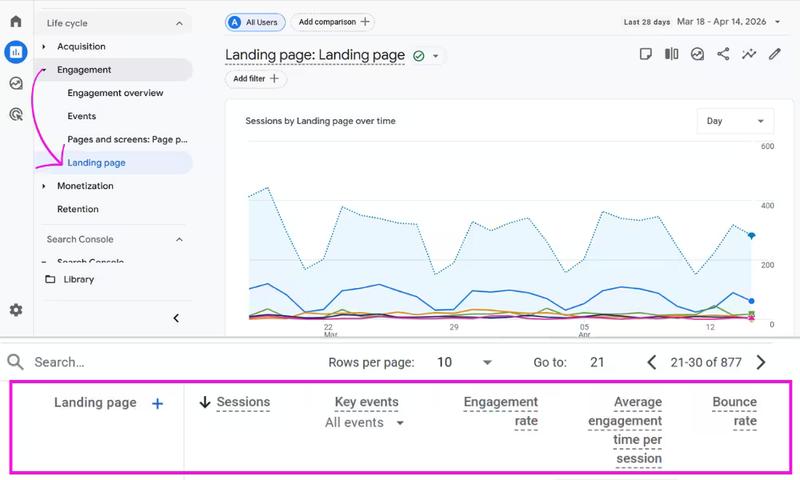
Sort by sessions, then scan these four columns:
| Metric | What It Reveals |
|---|---|
| Engagement rate | Percentage of sessions that lasted 10+ seconds, had a conversion event, or viewed 2+ pages. Low engagement rate on a high-traffic page = visitors arrived and immediately realized the page wasn't what they needed |
| Average engagement time | How long people actively interact. Under 30 seconds on a 2,000-word guide means they didn't find what they came for |
| Bounce rate | Single-page sessions with no engagement. High bounce + high traffic = classic intent mismatch signal |
| Key events (conversions) | Did visitors take the action your page was designed for? Traffic without conversions often means informational visitors landing on a transactional page |
Step 2 — Compare Pages Targeting Similar Keywords
Pull up two pages in the same topic cluster — say, your "what is X" guide and your "best X tools" roundup. Compare engagement metrics side by side.
If the educational guide has 3x the engagement time of the commercial page despite lower traffic, the commercial page is likely absorbing informational visitors who wanted the guide instead. Google Analytics just showed you the intent leak between your own pages.
Step 3 — Use Path Exploration to See What Users Actually Wanted
- Go to Explore → Free form
- In the left panel under Variables, click the + next to Dimensions → search and add Landing page
- In the left panel under Variables, click the + next to Metrics → search and add Sessions, Engagement rate, Average engagement time, Bounce rate
- Now move to the Tab Settings panel (the middle column):
- Drag Landing page from Dimensions into the Rows box
- Drag all four metrics into the Values box
5. Still in Tab Settings, scroll down to Filters → click it → select Landing page → set condition to contains → type your target URL slug (e.g., "entity-seo") → hit Apply.
This filters the exploration to only pages with that slug in the URL — so your "what is XYZ" guide and your "best entity XYZ tools" page appear side by side without the noise of your full site
Watch where users go next. If visitors consistently navigate from your product page to your blog, or from a pricing page to a "how it works" guide — they arrived with different intent than the page served. The path tells you what they were actually looking for.
Step 4 — Cross-Reference GA4 with GSC
This is where the full picture clicks together:
- GSC shows a page getting impressions for "how to" queries (informational demand)
- Google Analytics 4 shows that same page has a 34% engagement rate and 8-second average engagement time (behavioral confirmation)
Either signal alone could be noise. Both together? That's a confirmed intent gap backed by demand data and behavioral data. No paid tool required.
SERP Analysis: The 5-Minute Intent Check You Should Run Before Every Optimization
Data from GSC and GA4 tells you there's a gap. The SERP tells you what to do about it.
Before changing a single word on your page, Google the target keyword and read the results through three lenses — the 3 Cs framework:
- Content Type: What kind of pages dominate? Blog posts? Product pages? Category pages? Landing pages? Tools?
- Content Format: Within that type, what structure wins? Listicles? Step-by-step tutorials? Comparison tables? Reviews? Templates?
- Content Angle: What modifier or positioning do the top results share? "For beginners"? "In 2026"? "For small teams"? "Free"? "Enterprise"?
If eight of ten results are listicles with "best" in the title and yours is a definition post — the 3 Cs just diagnosed the mismatch faster than any tool could.
Read SERP Features as Intent Signals
The features Google adds around the blue links reveal what intent the algorithm has assigned to that query:
| SERP Feature | Intent Signal |
|---|---|
| Featured snippet (paragraph or list) | Direct informational — Google expects a concise answer |
| People Also Ask | Sub-intent expansion — users have follow-up questions your content should cover |
| Shopping carousel / product ads | Transactional — searchers are ready to buy |
| Video results in top 5 | Procedural or visual — people want to see, not read |
| AI Overview present | Informational with synthesis — Google is summarizing multiple sources into one answer |
| Local pack / map results | Location-based navigational — "near me" intent |
One thing worth checking: whether Google is generating an AI Overview for your query. If it is, the dominant intent is informational.
Your page needs to be structured clearly enough to become a cited source within that summary — not compete against it.
How to Fix Search Intent Gaps
You've found the gap. You've confirmed it in Google Search Console SC and Google Analytics 4. You've read the SERP. Now pick the right fix — because the wrong one wastes months.
Option A — Re-Align the Existing Page
Choose this when: the URL already has backlinks, ranks in positions 4–15, and the SERP wants the same general page type — just a different format or angle.
What re-alignment typically involves:
- Shift the format to match what's ranking. If the top results are step-by-step guides and yours is a wall of theory, restructure into numbered steps with clear outcomes per step.
- Adjust the angle. Add the modifier the SERP rewards — "for small teams," "in 2026," "on a budget." This often means rewriting your H1, intro, and subheadings rather than the entire body.
- Add decision assets the page is missing. Pricing context, comparison tables, pros/cons, use-case breakdowns, screenshots. These are the elements that turn a partial answer into a complete one — exactly what Section 2's "Intent Incomplete" pattern calls for.
- Rework the first screen. If the SERP rewards quick answers and your page takes 400 words to get to the point, you'll lose the click even if the rest is excellent.
Option B — Create a New Page and Reposition the Old One
Choose this when: your existing page serves a different intent well, and forcing a new intent onto it would destroy what already works.
Example: your "What is Entity SEO?" guide ranks well for informational queries. You discover commercial queries like "best entity SEO tools" hitting the same URL. Instead of cramming a tools list into an educational guide, build a dedicated comparison page and link between them.
This approach also prevents keyword cannibalization — two pages competing for the same query with diluted authority.
Option C — Refine Metadata Without Touching Content
Sometimes the page content already matches intent, but the title tag and meta description don't communicate that to searchers scanning the SERP.
Pull your highest-impression query clusters from GSC (Step 3 above). Rewrite your title and description using the exact language those queries contain.
A title that mirrors how your audience phrases the search earns more clicks — even without a single content change.
Research from Backlinko found that question-based titles generate 14.1% higher CTR. If your top GSC queries are phrased as questions and your title is a generic statement, that's a metadata gap with a measurable fix.
How to Prioritize Which Intent Gaps to Fix First
You'll find more gaps than you have bandwidth to fix. The wrong move is starting with your highest-volume keyword. The right move is starting with the highest-ROI fix.
Score each gap across four factors:
| Factor | High Priority | Low Priority |
|---|---|---|
| Current ranking | Positions 4–15 (close enough that intent alignment can push you up) | Positions 30+ (deeper issues than intent alone) |
| Business value | Commercial or transactional queries that lead to revenue | Informational queries with no clear path to conversion |
| SERP stability | Consistent format across top results — you know what to match | Volatile SERP that changes format weekly — risky to optimize for |
| Fix effort | Metadata rewrite or adding missing sections (hours) | Full page rebuild or new content creation (weeks) |
Multiply impact by ease. A page sitting at position 7 for a commercial keyword that just needs a comparison table and a better title? That moves the needle this week. A page at position 40 for an informational query that requires a complete rewrite? That's a backlog item, not a priority.
One filter that saves time: if a query's SERP is dominated by domains with significantly higher authority than yours, intent alignment alone won't close the gap. Focus on where your content quality can actually compete.
Keeping Intent Aligned as SERPs Evolve
As AI Overview presence doubled from roughly 13% of queries in early 2025 to 25.8% by January 2026.
A page perfectly aligned today can fall out of alignment in three months. SERPs shift as Google reinterprets queries, as user behavior changes, and as AI Overviews expand into new query categories.
That expansion didn't happen evenly — some informational SERPs flipped to AI-generated answers overnight, changing what "ranking" even means for those queries.
A lightweight quarterly habit that catches drift before it costs traffic:
Re-pull GSC data for your top 20 pages. Compare the query mix from this quarter to last. If new query patterns have emerged — especially ones misaligned with your page — the intent landscape shifted under you.
Re-check the SERP format for high-value terms. Look for format flips: informational SERPs that now show product carousels, or commercial SERPs where Google introduced an AI Overview. Each flip is a signal to re-evaluate your page type.
Monitor People Also Ask as a pulse-check. New PAA questions appearing for your target keyword mean new sub-intents are emerging. If your content doesn't address them, competitors who do will absorb that demand.
Update time-sensitive angles. Year references ("2025"), outdated tool names, old pricing — these age your content's relevance faster than any algorithm change.
The teams that treat intent alignment as a recurring check instead of a one-time audit are the ones that hold rankings through core updates rather than scrambling after them.
What to Do Right Now
Open Google Search Console. Filter by your top landing page. Look at the queries driving impressions.
If the words people searched don't match what your page delivers — you just found your first intent gap.
The fix might be a metadata rewrite you can ship today, or a content restructure you can plan this week. Either way, the data is already there. Use it.
Frequently Asked Questions
Everything you need to know about this topic.
A search intent gap is the disconnect between the goal a searcher has when typing a query and the content your page delivers. Even if you rank for the right keyword, a mismatch in format, depth, or stage of the buyer journey means the page fails to satisfy the user — and Google measures that.
Two signals confirm it: high impressions with low CTR in Google Search Console (the SERP shows your page but users skip it), and low engagement rate with high bounce in GA4 (users click but leave immediately). Both together eliminate guesswork.
Google Search Console and GA4 provide everything you need. GSC reveals the query-level demand your page attracts, and GA4 shows post-click behavior. Adding a manual SERP analysis for format and angle completes the picture — no Ahrefs or Semrush subscription required.
Quarterly for your top 20 pages. Monthly for high-revenue pages or queries in fast-moving niches. AI Overview expansion and core updates can shift SERP intent between review cycles, so high-value terms deserve closer monitoring.
Directly. AI Overviews pull from pages that match query intent with precision. A page misaligned on intent won't be cited in the AI-generated summary — even if it ranks organically on the same SERP.
Written By
Want help getting your brand ranked on Google and cited by AI?
We help businesses build AI visibility through SEO, content, and authority with clear revenue impact.
Book a Strategy Call