
LLM.txt doesn't, at least not for AI search visibility. Google's own generative AI optimization guide lists llms.txt under tactics site owners can ignore, and a June 2026 Ahrefs study of 137k domains found that 97% of published llms.txt files were never fetched at all.
Chrome's Lighthouse tool does check for the file, but only to flag server errors, not to reward having one. Still, the file has a real use case. But it's just narrower than most SEOs are selling it as.
So, in this guide, I'll walk through what the data actually says, who's reading these files, and how to build one correctly if you decide it's still worth your time.
What is LLMs.txt?
LLMs.txt is a plain-text Markdown file that sits at your site root. Its job: tell agents which pages on your site matter most.
You already have robots.txt for crawler access rules and sitemap.xml for listing every indexable URL. LLMs.txt does something different, it curates.
Instead of listing 5,000 URLs or setting allow/disallow directives, it highlights your top 20–50 pages with enough context for an agent to understand what each one covers. No HTML parsing required.
Jeremy Howard published the proposal on September 3, 2024. His reasoning: LLMs waste tokens on navigation menus, JavaScript, cookie banners, and ad scripts.
An llms.txt file hands them a clean summary with direct links to your best content instead.
By mid-2025, over 600 sites had adopted it, including Anthropic, Cloudflare, Stripe, Perplexity, Zapier, and Hugging Face.
How LLMs.txt Differs from Robots.txt and Sitemaps
| robots.txt | sitemap.xml | llms.txt |
|---|---|---|
| Purpose: Controls crawler access | Lists all indexable URLs | Curates priority content for AI |
| Format: Plain text directives | XML | Markdown |
| Audience: Search engine bots | Search engine bots | LLM crawlers and AI agents |
| Contains: Allow/Disallow rules | URLs with metadata | Summaries + links to key pages |
| Scope: Every crawlable page | Every indexable page | 20–50 most important pages |
| Adoption: Near-universal | Near-universal | ~10% |
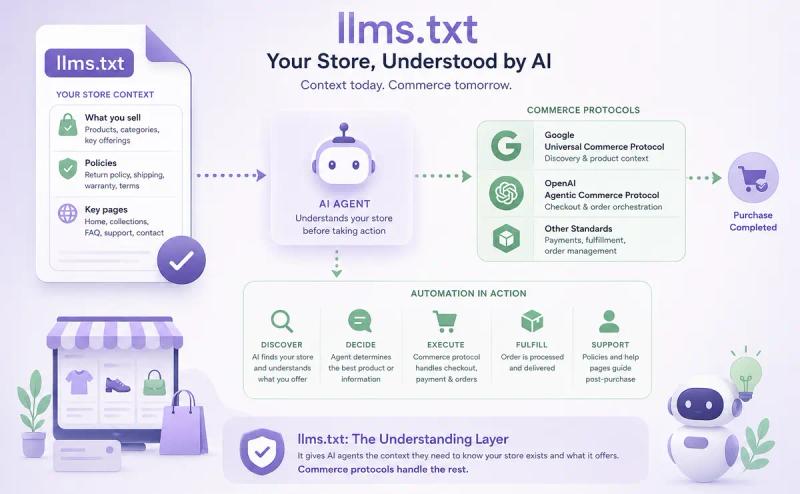
So, llms.txt plays a role in commerce as an understanding layer rather than a transaction layer. The file can tell an agent what a store sells, what its return policy is, and where its key pages live, the same brand-context job it does for a developer's coding agent.
Actually completing a purchase runs through separate protocols built for that job: Google's Universal Commerce Protocol, OpenAI's Agentic Commerce Protocol, and similar standards handle checkout, payment, and order management. llms.txt doesn't replace those.
It just gives an agent enough context to know your store exists and what it offers before any of that machinery kicks in.
What Google actually changed in June 2026
For most of 2025 and early 2026, Google's public position on llms.txt was a single line buried in a broader AI guide: special markup isn't needed to rank in generative AI search.
Practitioners read that sentence two ways. Some took it as Google speaking for the entire AI ecosystem. Others read it as scoped to Google Search alone.
On June 15, Google closed that gap. The updated Search Central guidance now spells out that none of these machine-readable files, AI-specific text files, or markup formats are required to show up in Google Search, and that scope explicitly covers its generative AI features, not just classic results.
That added phrase, tying the statement to "generative AI capabilities" by name, is the entire point of the update. It closes the loophole that let vendors argue Google's earlier wording only covered blue-link search and left AI Overviews and AI Mode as a gray area.
Here's the part that should actually change how you think about this file. Google didn't stop at "we don't use it." The same guidance goes further: building and maintaining an llms.txt file for other platforms that do consume it is entirely your call, and doing so carries no penalty and no boost to Google Search visibility, since Google's systems simply disregard the file either way.
That's a meaningfully different statement than "don't bother." Google isn't discouraging the file anymore. It's just being explicit that the file lives outside Google's grading system entirely. Neutral, not negative.
What the Ahrefs data shows about who's actually reading it
Google's statement answers half the question. It tells you Google ignores the file. It doesn't tell you whether anyone else reads it.
Ahrefs dug into server logs and live traffic across 137k domains using Ahrefs Web Analytics and found that about 28% publish an llms.txt file, much higher than the roughly 10% adoption reported in earlier studies.
The more revealing number, though, was usage. Of the 38,000 domains with a valid file, 97% received no requests at all in May 2026. The remaining 3% accounted for every recorded fetch, and 96% of that traffic came from bots.
Among those requests, GPTBot and Claude-Code led all named AI tools, while another 12% came from AEO monitoring tools, llms.txt validator, and researchers evaluating the standard. The rest was largely routine activity from web crawlers, SEO auditing tools, and other site-scanning bots.
One detail matters more than any percentage in this study. Zero AI bots ever requested an llms.txt file that didn't exist. They aren't probing for it speculatively. If a bot fetched the file, it's because something on that site, usually a known URL pattern or an explicit reference, pointed it there.
So, if we put Google's statement and Ahrefs' traffic data side by side, they tell the same story from two different angles. Google says its systems don't use the file. Ahrefs shows that almost nothing else does either, and what little traffic exists skews toward AI coding tools and the AEO industry studying itself, not the AI search and assistant products most businesses are trying to get cited in.
So where does llms.txt actually help?
The file isn't being read for AI search visibility. That doesn't mean it's pointless everywhere.
Chrome's Lighthouse tool now runs an Agentic Browsing audit, and llms.txt sits inside it under a category Chrome calls Discoverability, next to checks for WebMCP tool registration.
Chrome's own documentation explains the reasoning in one line: without the file, an agent has to spend more time crawling a site just to figure out its structure and primary content. That's a navigation problem, not a ranking one.
It's worth being precise about what the audit actually checks, because it's narrower than most coverage implies. Lighthouse flags a page only if the server throws an error while trying to retrieve llms.txt. If the file simply doesn't exist, the request returns a 404 and the audit is marked Not Applicable.
Chrome treats the file as optional for now. So this isn't a penalty for skipping llms.txt. It's a check for whether your server handles the request cleanly if something does go looking for it.
That distinction matters because it confirms what the file is actually for right now: helping an agent understand and navigate a site, not AI search citation. Google's own AI optimization guide draws the same line, pointing toward agentic experiences and protocols like Universal Commerce Protocol as the forward-looking area worth watching, while keeping llms.txt out of the ranking conversation entirely.
UCP itself handles the actual commerce transaction, llms.txt just gives an agent the brand-level context to act on in the first place. Claude-Code's strong showing in the Ahrefs data fits the same pattern on the developer side.
Coding agents and browser agents reading a site to complete a task are a real, growing use case. Consumer-facing AI search is not, at least not yet.
How to create an LLMs.txt file
So if you're building one, build it for the right audience. That means writing for AI agents trying to navigate or act on your site, not for AI search engines trying to decide whether to cite you.
The exact structure the llmstxt.org specification requires:
# Your Website Name

> One-sentence description of what your site does and who it serves.

## Core Content
- [Page Title](https://yoursite.com/page): What this page covers.
- [Another Page](https://yoursite.com/another): What this page covers.

## Optional
- [Secondary Resource](https://yoursite.com/resource): Supplementary context.
Let's break down each element.
Required Elements
H1 Title: Your site or company name. Single #. One line. Nothing else.
Blockquote Summary: Use > followed by 1–3 sentences. Think elevator pitch for machines: who you are, what you do, who you serve.
Skip the marketing language. "AI-powered SEO platform" works. "Revolutionary game-changing solution" doesn't.
Recommended Elements
H2 Sections: Group links by content type, such as Products, Guides, Blog, or Documentation. Each ## heading acts as a category label for AI models.
Links with Descriptions: Format as - [Title](URL): Description. That inline description gives an agent context about a page without requiring it to crawl and parse the full HTML, which is the entire efficiency gain Chrome's documentation describes.
File Requirements
| Requirement | Specification |
|---|---|
| File name | llms.txt (lowercase, plural) |
| Location | Site root: yoursite.com/llms.txt |
| Format | Plain text, Markdown syntax |
| Encoding | UTF-8 |
| MIME type | text/plain or text/markdown |
| Number of Pages | 20-50 |
| Max size | Under 100 KB (under 10 KB recommended) |
| Access | Public, no auth, no redirects |
| Protocol | HTTPS |
The optional section and llms-full.txt
The ## Optional heading has a specific purpose in the spec. It tells an agent it can skip everything below this line if it's running low on context.
Use it for secondary content like blog posts, case studies, or supplementary docs that add depth but aren't essential for understanding your core offering.
There's also a companion file called llms-full.txt. Where your llms.txt is a curated index, llms-full.txt contains the complete flattened Markdown text of your key pages in a single file.
Anthropic specifically requested Mintlify build this format for their documentation, since they needed a cleaner way to feed entire docs into LLMs without HTML overhead. It was later adopted into the official llmstxt.org standard.
Most non-technical sites don't need llms-full.txt.
If you run developer documentation, API references, or a knowledge base with 100+ pages, the case is stronger. Coding agents and API-integration tools are exactly the audience the Ahrefs data shows actually fetching these files. For everyone else, the standard llms.txt file is enough.
If you want to skip the manual work, use our free LLMs.txt Generator to build yours in under two minutes.
LLMs.txt Example: How Stripe structures its LLMs.txt
Stripe is a useful reference precisely because its llms.txt targets the audience that's actually reading these files: developers and the coding agents working on their behalf, not AI search engines.
Stripe publishes its llms.txt at docs.stripe.com/llms.txt.
It's one of the most detailed implementations out there, and a solid reference for how to organize a large site's content for an agent trying to integrate against your API, not for an AI Overview trying to summarize your product.
A condensed look at how Stripe's file is structured:
# Stripe Documentation

## Docs
- [Testing](https://docs.stripe.com/testing.md): Simulate payments to test your integration.
- [API Reference](https://docs.stripe.com/api.md)
- [Receive payouts](https://docs.stripe.com/payouts.md): Set up your bank account to receive payouts.
- [Supported currencies](https://docs.stripe.com/currencies.md): See what currencies you can use.
- [Security at Stripe](https://docs.stripe.com/security.md): Learn how Stripe handles security.

## Payment Methods
- [Payment Methods API](https://docs.stripe.com/payments/payment-methods.md): Learn more about the API that powers global payment methods.
- [How cards work](https://docs.stripe.com/payments/cards/overview.md): Learn how an online card payment works.
- [Buy now, pay later](https://docs.stripe.com/payments/buy-now-pay-later.md): Learn about BNPL methods with Stripe.

## Checkout
- [Use a prebuilt Stripe-hosted payment page](https://docs.stripe.com/payments/checkout.md)
- [How Checkout works](https://docs.stripe.com/payments/checkout/how-checkout-works.md): Learn how to use Checkout to collect payments.
- [Customize Checkout](https://docs.stripe.com/payments/checkout/customization.md): Customize the appearance and behavior.
(Stripe's actual file is far longer — it covers dozens of product areas. This is a representative sample.)
What makes this Work
Sections mirror how developers think: Stripe doesn't organize by internal team or department. The H2 headings, Docs, Payment Methods, Checkout, Payments, map to what a developer, or a coding agent acting on a developer's behalf, is trying to accomplish.
A coding agent answering "how do I accept Apple Pay with Stripe?" can jump straight to the right section instead of crawling the full docs site to find it.
Every link points to a .md version: Notice the URLs end in .md, not .html. Stripe serves Markdown versions of their documentation pages, following the llmstxt.org recommendation to provide clean, parseable content at the same URL with a .md extension.
This means an agent can fetch the linked page and get pure Markdown, with no nav bars, no JavaScript, no cookie banners. That's the exact crawl-efficiency gain Chrome's Lighthouse documentation describes as the reason the file exists.
Descriptions are task-oriented: "Simulate payments to test your integration" tells an agent exactly what the page solves. Compare that to a vague label like "Testing Documentation," which could mean anything.
Task-oriented descriptions help an agent match the right page to the right task without guessing.
The file is long, and that's intentional: Stripe's documentation covers payments, billing, subscriptions, Connect, Radar, Terminal, and more. Their llms.txt doesn't try to squeeze that into 10 links.
It runs hundreds of lines because their product surface is massive. The takeaway: your file length should match your content depth. A 5-page marketing site doesn't need 200 links. A developer platform with 50+ product areas might.
So how this applies to your site
You don't need Stripe's scale to use the same principles. Here's what to borrow, especially if your site has API docs, a knowledge base, or any surface a coding agent might need to parse:
Organize by task, not internal structure: Your CMS might group content by "Blog," "Resources," and "Company."
But your llms.txt should group by what an agent is trying to do: integrate with your API, look up a config option, find a webhook reference.
Link to the cleanest version of each page: If you can serve .md versions of your key pages, do it.
If not, make sure the linked pages have clean HTML with clear heading hierarchies and minimal JavaScript clutter.
Write descriptions that answer "what does this page help me do?" Not "Our comprehensive guide to..." Just the task. "Set up webhook notifications." "Troubleshoot payment declines."
Quick Templates for Other Site Types
Same principles, different industries:
SaaS / Software:
# YourSaaS

> Project management platform for remote teams. Task tracking, reporting, and integrations.

## Product
- [Features](https://yoursite.com/features): Core platform capabilities and use cases.
- [Pricing](https://yoursite.com/pricing): Plans, pricing tiers, and feature comparison.
- [API Docs](https://yoursite.com/docs): Developer integration guides.

## Resources
- [Case Studies](https://yoursite.com/cases): Customer results across industries.
- [Blog](https://yoursite.com/blog): Product updates and workflow tips.
E-commerce:
For a store, the file's job shifts slightly. An agent checking your store needs brand-level facts: what you sell, how shipping works, what the return window is, not a transaction interface. That's the understanding layer mentioned earlier, separate from whatever checkout protocol actually processes the order.
# YourStore

> Outdoor gear and equipment for hiking, climbing, and camping. Ships within the US and Canada.

## Products
- [Hiking Gear](https://yourstore.com/hiking): Boots, packs, and trail accessories.
- [Climbing Equipment](https://yourstore.com/climbing): Ropes, harnesses, and protection.

## Policies
- [Returns](https://yourstore.com/returns): 30-day return window, free exchanges, no restocking fee.
- [Shipping](https://yourstore.com/shipping): Delivery timelines and rates by region.

## Support
- [Size Guide](https://yourstore.com/sizing): Product sizing across categories.
- [Contact](https://yourstore.com/contact): Customer service hours and channels.
Notice the dedicated Policies section. That's the part most e-commerce llms.txt files skip, and it's exactly the kind of fact an agent needs before it can act on a customer's behalf, even when the actual checkout happens through a separate protocol.
Content Publisher:
# YourPublication

> Technology news and analysis covering AI, cloud infrastructure, and developer tools.

## Coverage Areas
- [AI & Machine Learning](https://yoursite.com/ai): Analysis of AI industry trends.
- [Product Reviews](https://yoursite.com/reviews): In-depth evaluations of developer tools.

## About
- [Editorial Standards](https://yoursite.com/editorial): Our reporting methodology.
- [Team](https://yoursite.com/team): Writers and subject matter experts.
Notice the pattern across all three: factual descriptions, task-based sections, and 5–10 links maximum. You can always expand, but start lean.
Run any llms.txt file through our free LLMs.txt Validator to check for structural errors and broken links before publishing.
How to use LLMs.txt (Best practices)
You've built the file for the agents that might actually read it. Now it needs to be live, accessible, and fast enough that those agents don't abandon the request.
1. Where to Upload
The process varies by platform, but the destination is always the same: your site root, accessible at yoursite.com/llms.txt.
WordPress: Upload via FTP or cPanel File Manager to your public_html/ directory.
Or use a plugin. Yoast and Rank Math both support auto-generating llms.txt files now.
Shopify: Go to Online Store → Themes → Edit Code → Assets folder → Add a new asset → name it llms.txt, paste your content, and save.
Static sites (Next.js, Hugo, Jekyll, Gatsby): Drop the file into your public/ or static/ directory. It'll deploy with your next build.
Custom CMS or app: Either create a /llms.txt route that returns plain text, or serve a static file from your public directory.
2. Pre-Launch Checklist
Before you announce it, verify these. This list doubles as a rough version of what Chrome's Lighthouse audit is checking for when it flags a server error on the file.
| Check | What to look for |
|---|---|
| HTTP status | yoursite.com/llms.txt returns 200 (not 301, 404, or 403) |
| Content-Type | Header shows text/plain or text/markdown |
| Encoding | UTF-8 |
| Authentication | No login wall — publicly accessible |
| HTTPS | Served over a secure connection |
| H1 present | File starts with # Your Site Name |
| Blockquote present | Summary line using > directly after H1 |
| Links working | Every URL in the file returns 200 |
Quick terminal check: run curl -I https://yoursite.com/llms.txt and verify the status code and Content-Type header.
3. Caching and Performance
Set your cache headers to 24 hours. Agents don't need to re-fetch this file every request, and caching keeps your server load minimal.
Target a response time under 200ms. Coding agents and browser agents operate under tighter time budgets than traditional search engine bots, so slow responses may get abandoned entirely. That's the same failure mode Lighthouse's audit is built to catch.
What actually drives AI Citation (llms.txt Isn't It)
If your real goal is getting cited by ChatGPT, Perplexity, or AI Overviews, llms.txt was never the lever, and the data above explains why. So what is?
SE Ranking ran the most direct test of this, analyzing 129,000 domains and over 216,000 pages to build a model predicting ChatGPT citation likelihood. llms.txt was one of the inputs they tested.
Removing it from the model actually improved the model's predictive accuracy, which is about as clean a "this isn't a real signal" result as a study can produce.
So what did move the needle, according to the same study:
- Sites with over 32,000 referring domains are 3.5 times more likely to be cited by ChatGPT than those with fewer than 200.
- Domains with profiles on Trustpilot, G2, Capterra, Sitejabber, or Yelp have 3 times higher odds of being chosen as a source than domains without any review-platform presence.
- Pages with a First Contentful Paint under 0.4 seconds average 6.7 citations, compared to 2.1 for pages slower than 1.1 seconds.
The pattern across all three is authority and performance, not curation. AI systems are citing sites that already have backlink depth, third-party validation, and fast-loading pages. None of that shows up in an llms.txt file. It shows up in years of link building, review collection, and technical SEO work.
That's the actual takeaway from pairing the Ahrefs traffic data with this correlation data. llms.txt doesn't make a thin site citable. It just gives a slightly faster index to a site that was already going to get cited on the strength of its content and authority.
So, if you're choosing where to spend an afternoon this month, an llms.txt file will not move your AI citation rate. Getting featured on G2 or fixing a slow-loading product page might.
User-agent: GPTBot
Allow: /

User-agent: ClaudeBot
Allow: /

User-agent: Google-Extended
Allow: /

User-agent: OAI-SearchBot
Allow: /

User-agent: PerplexityBot
Allow: /
If you've previously added blanket Disallow: / rules for these bots, your content is invisible to those AI systems regardless of what your llms.txt says.
Monitor AI crawler activity
Check your server logs for visits from these user agents:
GPTBot(OpenAI)ClaudeBot(Anthropic)Google-Extended(Google AI training)OAI-SearchBot(OpenAI search)PerplexityBot(Perplexity)
If these bots are hitting your key URLs, your content is being ingested. If they're not showing up at all, troubleshoot: check your robots.txt rules, verify your pages are publicly accessible, and confirm your server isn't rate-limiting or blocking unknown user agents.
So, here's the combined checklist: the things that actually move AI citation, separate from the llms.txt file itself.
| Category | Action |
|---|---|
| Access | robots.txt allows GPTBot, ClaudeBot, Google-Extended, OAI-SearchBot, PerplexityBot |
| Content | Key pages use clear headings, comparison tables, and Q&A format |
| Authority | At least one external signal (backlink, press mention, third-party review) per key page |
| Performance | Pages load with FCP under 0.4 seconds |
| Freshness | Content updated within the last 6 months |
| Monitoring | Server logs checked monthly for AI crawler activity |
| llms.txt | Optional. Useful for coding agents and developer docs. Not a citation lever. |
Common LLMs.txt Mistakes (And How to Avoid Them)
Most of these take under five minutes to fix. The bigger mistake, though, is the one that isn't on this table: treating the file as an AI search tactic in the first place.
1. Technical Mistakes
| Mistake | Fix |
|---|---|
| File in a subdirectory (/seo/llms.txt) | Move to site root (/llms.txt) |
| Served as text/html | Set Content-Type to text/plain |
| Behind authentication or login | Make publicly accessible — no login wall |
| Returns 404 or redirect | Confirm file exists and returns HTTP 200 directly |
| Links in the file point to broken pages | Audit every URL before publishing |
2. Content Mistakes
| Mistake | Fix |
|---|---|
| Listing every page on the site | Curate 20–50 high-priority pages |
| Promotional language ("revolutionary platform!") | Factual descriptions ("Project management software with task tracking and reporting") |
| Missing blockquote summary | Add > summary directly after H1 |
| Outdated links or descriptions | Review quarterly |
| Including private or sensitive pages | Only list public, high-value content |
3. Strategy Mistakes
| Mistake | Fix |
|---|---|
| Expecting the file alone to drive AI traffic | Pair with content quality, structured data, and authority signals |
| Never updating after initial setup | Review when publishing cornerstone content or restructuring URLs |
| Blocking AI crawlers in robots.txt | Verify robots.txt allows AI user agents |
| No monitoring | Check server logs monthly for AI crawler visits |
LLMs.txt Maintenance and Update Schedule
The file is live. So, don't let it go stale and update on a rigid calendar.
Only update when something changes:
- New cornerstone content published
- URLs restructured or pages consolidated
- Product or pricing pages updated
- Contact information changed
- Old pages removed from the site
Review Cadence:
| Frequency | Action |
|---|---|
| Weekly | Verify file loads (HTTP 200, correct MIME type) |
| Monthly | Check linked URLs for 404s; review server logs for AI crawler visits |
| Quarterly | Full content review — add new pages, remove outdated ones, refresh descriptions |
Version Control: Keep a simple changelog.
Date each update, note what changed and why. Even a Google Doc or a Git commit history works.
The important thing: when you change URLs on your site, update your llms.txt before the old URLs start returning 404s. A broken link in the file is the one thing that actually shows up as a measurable problem, since it's the exact failure Lighthouse's audit checks for.
What to do next
llms.txt is low-cost, low-risk infrastructure for a narrow audience: coding agents and browser agents navigating your site, not AI search engines deciding whether to cite you.
Google's June 2026 guidance makes that explicit. Ahrefs' traffic data confirms almost nothing else is reading the file. And SE Ranking's citation model shows it's not even a useful predictor of who gets cited.
Three steps to take today:
- Build your file for the right audience. Use our free LLMs.txt Generator to create a properly formatted file in minutes, especially if you run developer documentation or an API.
- Validate it. Run it through our LLMs.txt Validator to catch structural errors and broken links, the kind that show up as failures in Chrome's Lighthouse audit.
- Spend the rest of your time on what actually drives AI citation. Backlinks, review-platform presence, page speed, and clear content structure. That's where the data says the return is.
Note: llms.txt itself is still evolving, and Claude-Code's strong showing in the Ahrefs data suggests agentic and coding use cases may grow. But the content fundamentals that drive AI citation, authority, structure, and speed are already proven across every study referenced in this guide.
So build the file if your audience justifies it. Don't expect it to replace the rest of the work.
Frequently Asked Questions
Everything you need to know about this topic.
It's a Markdown file at your site root, yoursite.com/llms.txt, listing your most important pages with short descriptions. It was built so AI systems could skip parsing full HTML pages. In practice it's mainly read by coding agents and developer tools, not consumer AI search products like ChatGPT or AI Overviews.
No effect either way. Google's June 2026 Search Central guidance states explicitly that llms.txt has no impact on visibility in Google Search, including AI Overviews and AI Mode. Google's systems don't read the file for ranking decisions, so publishing one carries no upside or downside for Search.
The evidence says no. SE Ranking tested llms.txt as a predictor in a citation model built from 129k domains, and removing it from the model improved accuracy. Citation likelihood correlates with backlinks, review-platform presence, and page speed instead, none of which a curated index file changes.
Almost nobody. Ahrefs analyzed 137k domains in June 2026 and found that 97% of published llms.txt files received zero requests in May. Of the small fraction that did get fetched, most traffic came from bots, and a meaningful share came from SEO tools and researchers checking the files, not AI systems.
Lighthouse's Agentic Browsing audit flags llms.txt only if your server returns an error while trying to serve the file. A missing file, a normal 404, is marked Not Applicable rather than penalized. Chrome currently treats the file as optional, so the audit checks for broken delivery, not for adoption.
It depends on your audience. The Ahrefs data shows Claude-Code and GPTBot account for the largest share of named-AI fetches, which points to coding agents and developer tooling as the real use case. If you run API docs or technical content, it has low cost and plausible upside. For a typical marketing site, it's optional.
llms.txt is a curated index: your top pages with one-line descriptions and links. llms-full.txt contains the complete flattened Markdown text of those pages in a single file. Mintlify built the format for Anthropic's documentation, and it later became part of the official llmstxt.org specification.
Yes, completely. If your robots.txt has a blanket Disallow rule for GPTBot, ClaudeBot, PerplexityBot, or similar user agents, those systems can't reach your content regardless of what your llms.txt says. Check your robots.txt before troubleshooting anything else if AI crawler visits aren't showing up in your logs.
Only when something actually changes: new cornerstone content, restructured URLs, updated pricing pages, or removed sections. Weekly, confirm the file still returns a 200 status. Monthly, check that every linked URL works. Quarterly, do a full content review and refresh any descriptions that have gone stale.
The audit only fails on server errors when retrieving the file, not on missing files or formatting issues. The most common cause is a misconfigured route or redirect that throws a 500 instead of serving plain text. Test with a direct request to yoursite.com/llms.txt and confirm it returns a clean 200 response.
Written By
Want help getting your brand ranked on Google and cited by AI?
We help businesses build AI visibility through SEO, content, and authority with clear revenue impact.
Book a Strategy Call