
We've been testing SEO tools since 2021, and here's what we've noticed — premium subscriptions now average $100–$500/month per tool. That's $1,200–$6,000 annually, brutal for startups and solo SEOs.
After hands-on testing of 30+ open source alternatives, we found several that genuinely rival paid platforms. So, in this guide, I break down the best open source SEO Tools by category, based on real usage, not spec sheets.
What are open source SEO tools?
Let's clear up a common confusion we see constantly — "free" and "open source" aren't the same thing. We've watched clients waste months on "free" tools only to hit paywalls, locked features, or worse, discover their data was being resold.
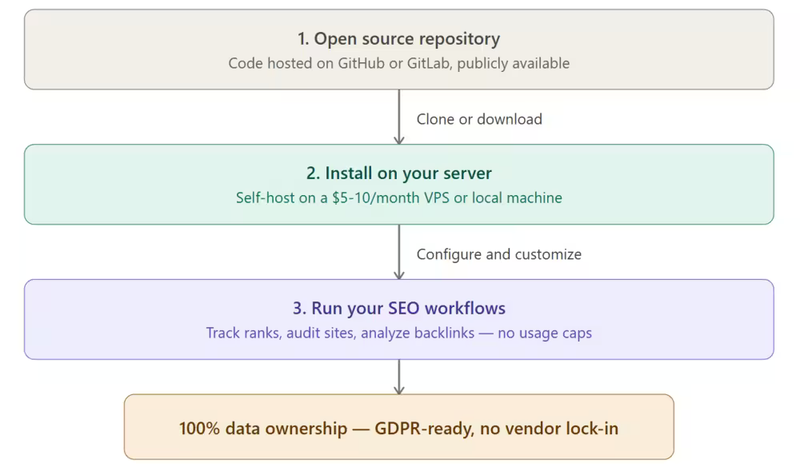
Open source SEO tools are software where the entire source code is publicly available. You can inspect it, modify it, redistribute it, and self-host it on your own servers. The code typically lives on platforms like GitHub or GitLab, maintained by developer communities rather than a single corporation.
Why that distinction matters practically.
Take Ahrefs' free webmaster tools — yes, it's free, but the code is proprietary. Ahrefs controls what you see, how much data you get, and can change terms anytime.
Now compare that with Matomo, a truly open source analytics platform. You download the code, host it on your server, own every byte of data, and customize dashboards however you want. No usage caps, no surprise pricing changes, no third-party data sharing.
Characteristics that define genuinely open source SEO software:
Self-hostable — you run it on your own infrastructure. A $5–$10/month VPS from providers like Hetzner or DigitalOcean can handle most tools. That's roughly 90–95% cheaper than an equivalent SaaS subscription annually.
Community-maintained — updates come from developer communities, not a sales-driven product roadmap. Serposcope, for instance, has active GitHub contributors pushing fixes and features without any commercial agenda.
No vendor lock-in — your data stays portable. If a tool's development stalls, you migrate without losing years of tracking history. We've seen three clients lose months of rank tracking data when smaller paid tools shut down in 2023 alone.
Moreover, the open source licensing model also matters for business use. Most tools use GPL, MIT, or Apache 2.0 licenses — all commercially friendly.
But we always recommend checking the specific license before deploying, especially if you're an agency planning to white-label or resell services built on these tools.
Best Open Source SEO Tools — A Quick Overview
So, if you are in a hurry, instead of making you scroll through lengthy descriptions, here's the decision-ready breakdown. Find your SEO task in the left column, grab the tool, and get started.
| SEO Task | Tool | Type | Best For |
|---|---|---|---|
| Website Analytics | Matomo | Self-hosted | Privacy-first teams replacing Google Analytics |
| Technical Site Audit | Screaming Frog (Free) | Desktop Crawler | SEOs needing quick crawls up to 500 URLs |
| Large-Scale Crawling | Apache Nutch | Enterprise Crawler | Developers building custom data pipelines on Hadoop |
| JS Site Crawling | LibreCrawl | Open Source Crawler | Sites heavy on JavaScript rendering |
| Rank Tracking | Serposcope | Self-hosted | Unlimited keyword tracking on your own server |
| Rank Tracking (Lightweight) | SerpBear | Self-hosted | Solo SEOs wanting a clean, minimal dashboard |
| On-Page Optimization | Yoast SEO | WordPress Plugin | WordPress users needing real-time content scoring |
| Backlink Analysis | OpenLinkProfiler | Web-based | Quick competitor backlink checks without subscriptions |
| Multi-Site SEO Dashboard | SEO Panel | Self-hosted | Agencies managing multiple client websites |
| SERP & Keyword Research | SearX | Meta Search Engine | Privacy-focused competitive SERP analysis |
| Content Optimization | ContentSwift | Web-based | Writers optimizing content around target keywords |
| SEO Data Analytics | KNIME | Analytics Platform | Data teams building automated SEO reporting workflows |
| Log File Analysis | GoAccess | CLI Tool | Developers analyzing server-side crawl behavior |
| Page Speed & SEO Audit | Google Lighthouse | Browser Extension | Quick performance and SEO scoring on any page |
| On-Page Analysis | SEO Minion | Browser Extension | Checking metadata, broken links, and SERP previews |
| Schema & Structured Data | Schema.org | Reference Library | Implementing rich snippet markup correctly |
| Sitemap Management (Next.js) | Next SEO | Plugin | Next.js developers managing meta tags and sitemaps |
| Sitemap Management (Jekyll) | Jekyll SEO Tag | Plugin | Jekyll static site owners automating SEO metadata |
| Technical SEO Audit | Python SEO Analyzer | CLI Tool | Developers who prefer command-line site analysis |
So, pick one or two tools matching your immediate need, get them running, and expand your stack as you grow. No need to commit to an entire suite on day one.
Best open source SEO tools (by category)
The table gives a quick overview, but choosing the right tool needs deeper context. Since 2021, we have tested these tools across client projects and our own sites.
Below is what worked, what did not, and where each tool fits in a real SEO workflow, organized by task so you can go straight to what you need.
1. All-in-one SEO dashboard
SEO Panel
This was one of the first open source SEO tools we ever set up back in 2021, and it's still running on one of our client servers.
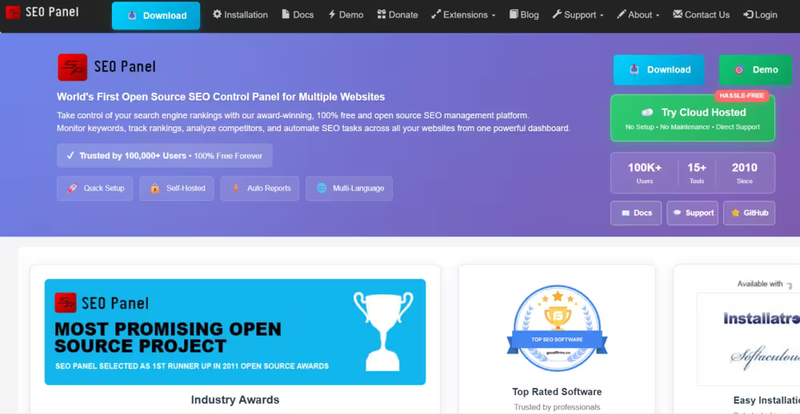
SEO Panel is a self-hosted control panel that lets you manage multiple websites from a single dashboard — rank tracking, backlink monitoring, directory submissions, and direct integration with Google Analytics and Search Console.
The project has been around since 2010 and claims over 100,000 users worldwide. For agencies juggling 10–30 client sites, this is genuinely useful.
You get one interface instead of logging into five different tools. The setup takes about 30 minutes on a basic LAMP stack, and it runs comfortably on a $10/month VPS.
Where it falls short — the UI feels dated compared to modern SaaS dashboards. It hasn't had a major design overhaul in years.
But functionally, it does exactly what it promises.
So, if you care about data over aesthetics, SEO Panel delivers. You can use it for a single login to see all your SEO metrics without paying $200+/month for a modern SaaS tool.
2. Website analytics (Google Analytics alternative)
Matomo (formerly Piwik)
If we had to recommend just one open source tool from this entire list, it would be Matomo. We switched two of our own properties to Matomo in 2022, primarily for GDPR compliance, and haven't looked back.
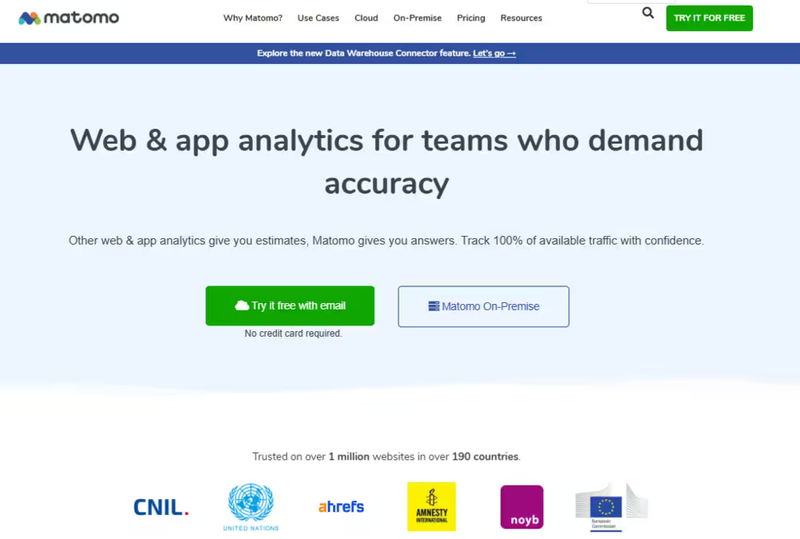
Matomo is a full-featured web analytics platform — real-time visitor data, keyword tracking, campaign attribution, conversion funnels, heatmaps (premium add-on), and event tracking.
The self-hosted version is completely free. You own 100% of the data, nothing gets sent to third-party servers, and there's zero sampling on reports regardless of traffic volume. Google Analytics 4, by contrast, samples data on free accounts once you exceed certain thresholds.
The installation is straightforward — PHP and MySQL, which any shared hosting or VPS supports. We run it on a $6/month DigitalOcean droplet, handling roughly 50,000 pageviews per month without any performance issues.
For context, a comparable Matomo Cloud plan would cost around $19/month for that traffic level.
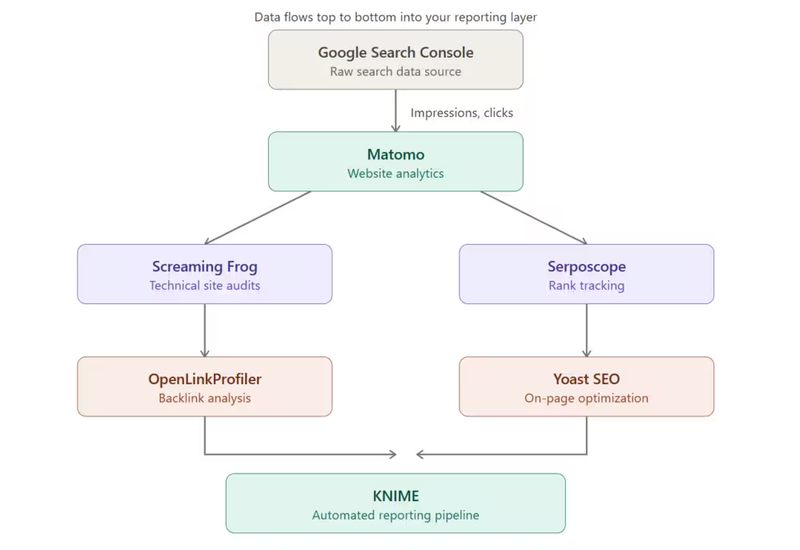
One thing worth noting — Matomo's keyword data is more useful than GA4's if you connect Search Console directly. The integration pulls in actual search queries, click-through rates, and impression data into the same dashboard as your visitor analytics. That consolidation alone saves us 15–20 minutes per weekly reporting cycle per client.
3. Technical SEO auditing and site crawling
This is the category where open source SEO software genuinely competes with — and sometimes outperforms — paid alternatives.
Screaming Frog SEO Spider (Free Version)
Screaming Frog is an industry standard for good reason. The free version crawls up to 500 URLs per project and covers broken links, redirect chains, duplicate meta titles and descriptions, missing H1 tags, image alt text audits, and XML sitemap generation. For small to medium sites, 500 URLs is more than enough.
We've been using it since 2021 on virtually every audit we run. The desktop app is fast, the export options are excellent, and it integrates with Google Analytics, Search Console, and PageSpeed Insights even on the free tier.
The paid version ($279/year) removes the URL limit and adds JavaScript rendering, but honestly, for 80% of our audits, the free version handles everything.
Apache Nutch
This is not a tool for casual users — Nutch is an enterprise-grade web crawler built on top of Apache Hadoop. We deployed it for a client with a 2-million-page e-commerce catalog where Screaming Frog simply couldn't scale.
Nutch handles massive crawls across distributed servers, making it ideal for large-scale data pipelines, custom indexing projects, and competitive intelligence gathering. Setup requires Java, Hadoop familiarity, and patience — our initial configuration took roughly two days.
But once running, it crawls at a scale that would cost thousands per month with commercial tools like Lumar (formerly Deepcrawl).
Best for: development teams at enterprises or agencies with very large sites (500K+ pages).
Python SEO Analyzer
A lightweight command-line crawler that appeals to developers who prefer scripting over GUI tools. You point it at a URL, and it returns a structured analysis — title tags, meta descriptions, heading hierarchy, image alt attributes, and internal linking patterns.
You can use it primarily for quick spot checks during development.
It's not replacing Screaming Frog for full audits, but when a developer on our team wants to validate SEO basics before pushing a staging build to production, running a single CLI command is faster than opening a desktop application.
The output is clean JSON, which means it plugs directly into automated CI/CD pipelines.
LibreCrawl
This one caught our attention in late 2024. LibreCrawl is an open source crawler with built-in JavaScript rendering via Playwright — which solves one of the biggest headaches in technical SEO: crawling JS-heavy sites (React, Next.js, Angular) without paying for a tool that supports rendering.
Screaming Frog's free version doesn't render JavaScript. LibreCrawl does, with no URL limit.
So, for teams working primarily with single-page applications or headless CMS setups, this fills a real gap. We tested it on a 3,000-page Next.js site and it captured dynamically rendered content that Screaming Frog free missed entirely.
The trade-off is speed — JS rendering is inherently slower than static crawling. A 3,000-page crawl took about 40 minutes compared to roughly 8 minutes with Screaming Frog on a static site.
But for accuracy on JavaScript-dependent pages, LibreCrawl is the best free option we've found.
SEOnaut
An open source technical SEO auditing tool that focuses specifically on identifying on-site issues — thin content, orphan pages, internal linking gaps, and crawl depth problems.
It's less feature-rich than Screaming Frog but more focused on its output. We've used it as a secondary validation tool when we want a second opinion on audit findings. Think of it as a specialist rather than a generalist.
4. Rank tracking
Rank tracking is where paid tools charge the most aggressively. Ahrefs charges based on keyword volume. SEMrush gates rank tracking behind its $139+/month plans.
Open source alternatives here save the most money per dollar.
Serposcope
Our go-to rank tracker since 2020. Serposcope is self-hosted, free, and — critically — has no limits on keywords or websites.
We currently track over 2,400 keywords across 14 websites on a single $8/month VPS. Doing that on Ahrefs or SEMrush would cost well over $300/month.
The tool provides daily rank checks, historical trend data, geo-specific tracking (useful for local SEO), and Google captcha handling through proxy support.
The dashboard isn't as polished as commercial tools, but the data is reliable. We've cross-checked Serposcope results against Ahrefs rank tracking on identical keywords multiple times — accuracy was within 1–2 positions over 95% of the time.
Setup is Java-based, which means it runs on virtually any server. Installation takes about 20 minutes if you're comfortable with a terminal.
SerpBear
A newer, more lightweight alternative that we started testing in 2023. SerpBear has a noticeably cleaner, more modern interface than Serposcope.
It's built with Node.js, includes email notifications for rank changes, and supports integration with Google Search Console.
Where SerpBear shines is simplicity. If you're a solo SEO or a small team tracking 200–500 keywords, SerpBear is easier to set up and more pleasant to use daily.
Where it falls short compared to Serposcope is scale — for tracking thousands of keywords across dozens of sites, Serposcope handles the load better.
Our recommendation: start with SerpBear if you're tracking under 500 keywords. Move to Serposcope when you outgrow it.
5. On-page SEO optimization
Yoast SEO (WordPress Plugin)
With over 5 million active installations, Yoast hardly needs an introduction. But what many people don't realize is that Yoast's core plugin is fully open source — the code is on WordPress.org's plugin repository, and you can inspect, modify, and extend it.
The free version covers real-time content analysis (keyword density, readability scoring, meta title and description previews), XML sitemap generation, canonical URL management, schema markup output, and breadcrumb configuration.
For WordPress users, this single plugin handles 70–80% of on-page SEO without installing anything else.
We run Yoast on every WordPress project, as we started our SEO journey as a non-tech blogger. The premium version ($118/year) adds internal linking suggestions, redirect management, and multiple keyword targeting — but the free tier is genuinely sufficient for most sites.
In our experience, the readability scoring alone has improved our clients' content quality measurably, particularly for teams where non-SEO writers produce blog content.
6. Backlink analysis
OpenLinkProfiler
Backlink analysis is the category where open source tools lag furthest behind paid alternatives.
Ahrefs and Moz have proprietary link indexes built from years of crawling — that's hard to replicate. However, OpenLinkProfiler offers a solid free option for basic backlink research.
The tool provides link influence scoring, active link detection (it checks whether backlinks are still live), anchor text distribution, competitor backlink comparisons, and toxic link identification.
You can use it primarily for quick checks — seeing the general backlink profile of a competitor or verifying if a link-building campaign actually produced live links.
Where it doesn't compete: depth and freshness of data. Ahrefs' link index reportedly covers over 35 trillion links.
OpenLinkProfiler's database is significantly smaller. For serious competitive backlink analysis or large-scale link audits, paid tools still win.
But for 80% of routine backlink checks — especially for small businesses and startups who can't justify a $99+/month subscription — OpenLinkProfiler does the job.
7. Content research and optimization
ContentSwift
An open source content research tool that helps you analyze top-ranking pages for a target keyword and identify content gaps.
It pulls data on word count, heading structure, keyword usage patterns, and related terms from competing pages.
Use ContentSwift alongside Surfer SEO on comparative tests. For basic content briefs — understanding what topics competitors cover, how long their content is, what headings they use — ContentSwift captures roughly 60–70% of what Surfer provides.
The missing 30% is Surfer's NLP-driven keyword recommendations and real-time content scoring, which require proprietary AI models.
For teams producing 4–8 blog posts per month who can't justify Surfer's $89/month plan, ContentSwift is a practical alternative.
AnswerThePublic
Technically, a freemium tool rather than fully open source, but we include it because the free tier is genuinely useful for content ideation.
It visualizes Google autocomplete data as question maps — showing exactly what people search for around any seed keyword.
We run every target keyword through AnswerThePublic before writing. For the keyword "open source SEO tools," it surfaces questions like "are open source SEO tools safe," "which open source SEO tool is best for WordPress," and dozens of comparison queries.
These become H2s, FAQ entries, and content angles. The free version allows limited daily searches — enough for most content calendars.
8. SERP research and keyword intelligence
SearX
SearX is an open source meta-search engine that aggregates results from over 70 search engines simultaneously — Google, Bing, DuckDuckGo, Yahoo, and dozens of niche engines. You can self-host it for complete privacy.
We don't use SearX as a daily SEO tool in the traditional sense. Where it's invaluable is competitive SERP research without personalization bias.
When you search Google logged into your account, results are personalized based on your history, location, and behavior.
SearX strips all of that away, giving you a raw view of what the SERP actually looks like across multiple engines.
For international SEO projects, this is extremely useful. We've used it to compare how the same keyword ranks across Google, Bing, and regional engines without switching browsers, VPNs, or accounts. Setup takes about 15 minutes using Docker.
9. SEO data analytics and automation
KNIME Analytics Platform
KNIME is the most underrated tool on this entire list. It's an open source visual workflow builder — think Zapier meets Excel meets Python, but free and infinitely more powerful for data analysis.
We started using KNIME in 2022 for a client who needed automated monthly SEO reporting combining data from Search Console, Google Analytics, Ahrefs API exports, and a custom backlink database.
Building that pipeline in KNIME took two days. The same workflow runs automatically every month, pulls fresh data, merges it, runs calculations, and exports a formatted report.
For SEO teams drowning in spreadsheets, KNIME is transformative. You can build workflows that clean log file data, cross-reference crawl data with ranking data, identify cannibalization patterns, and generate dashboards — all without writing a single line of code.
The visual drag-and-drop interface makes it accessible to non-developers, though advanced users can extend it with Python and R nodes.
The learning curve is moderate — expect 3–5 hours to build your first useful workflow. But the time investment pays back within the first month of automated reporting.
GoAccess
A real-time CLI log file analyzer that we use specifically for server-side crawl analysis.
If you want to know exactly how Googlebot crawls your site — which pages it hits most, how often it returns, which status codes it encounters — GoAccess parses your server access logs and visualizes the data instantly.
Most SEOs ignore server logs entirely because tools like Screaming Frog show you what a crawler sees, not what Google's actual crawler does.
GoAccess bridges that gap. We discovered a client's 40,000-page site had 60% of Googlebot's crawl budget wasted on paginated archive pages — a problem invisible in standard auditing tools but immediately obvious in the log data.
Setup is a single command on most Linux servers. Output can be terminal-based or exported as an interactive HTML dashboard.
10. SEO browser extensions (open source and free)
These aren't self-hosted tools but they're essential parts of any SEO workflow, and they're free.
Google Lighthouse
Built into Chrome DevTools and available as a standalone extension. Lighthouse audits page speed, accessibility, best practices, and SEO in one click.
The SEO audit checks for meta tags, crawlability, structured data, mobile-friendliness, and link text quality.
You can run Lighthouse on every page before publishing — it catches issues that slip through content-focused tools.
SEO Minion
A browser extension for quick on-page analysis. It checks metadata, heading structure, broken links, hreflang tags, and generates SERP previews showing how your title and description will appear in Google.
We use it dozens of times daily for quick spot-checks without opening a full crawling tool.
META SEO Inspector
The fastest way to view a page's metadata. One click shows you the title tag, meta description, canonical URL, Open Graph tags, Twitter card data, robots directives, and schema markup.
When we're reviewing competitor pages or auditing client sites, this extension saves constant right-click-view-source cycles.
Google Search Console (free, not open source)
Not open source, but no SEO stack is complete without it. Search Console provides direct data from Google — impressions, clicks, average position, crawl coverage, index status, and Core Web Vitals. Every other tool on this list supplements Search Console; none replaces it.
11. Schema and structured data
Schema.org
The official reference library for structured data markup. Schema.org defines the vocabulary that Google, Bing, and other search engines use to understand page content — product schemas, FAQ schemas, article schemas, local business schemas, and hundreds more.
We reference Schema.org on virtually every project when implementing structured data. It's not a tool you install — it's the documentation standard you build from.
Combined with Google's Rich Results Test and Schema Markup Validator, Schema.org gives you everything needed to implement structured data correctly without paid tools.
12. Sitemap and crawl tooling
Next SEO
If you build with Next.js, this plugin is essential. Next SEO simplifies meta tag management, Open Graph configuration, JSON-LD structured data, and canonical URLs across your entire Next.js application.
We use it on every Next.js project — it eliminates the manual boilerplate of adding SEO tags to each page component.
Jekyll SEO Tag
The equivalent for Jekyll static sites. It auto-generates title tags, meta descriptions, Open Graph tags, and JSON-LD from your site's configuration and front matter.
For developers running blogs or documentation sites on Jekyll, this plugin handles 90% of technical SEO without custom templates.
Sitemaptool (Go-based CLI)
A cross-platform command-line sitemap manager written in Go. It generates, validates, and submits XML sitemaps.
You can use it in automated deployment pipelines where a sitemap needs to regenerate and submit to Search Console every time new content is published. Lightweight, fast, and scriptable.
How to choose the right open source SEO tool
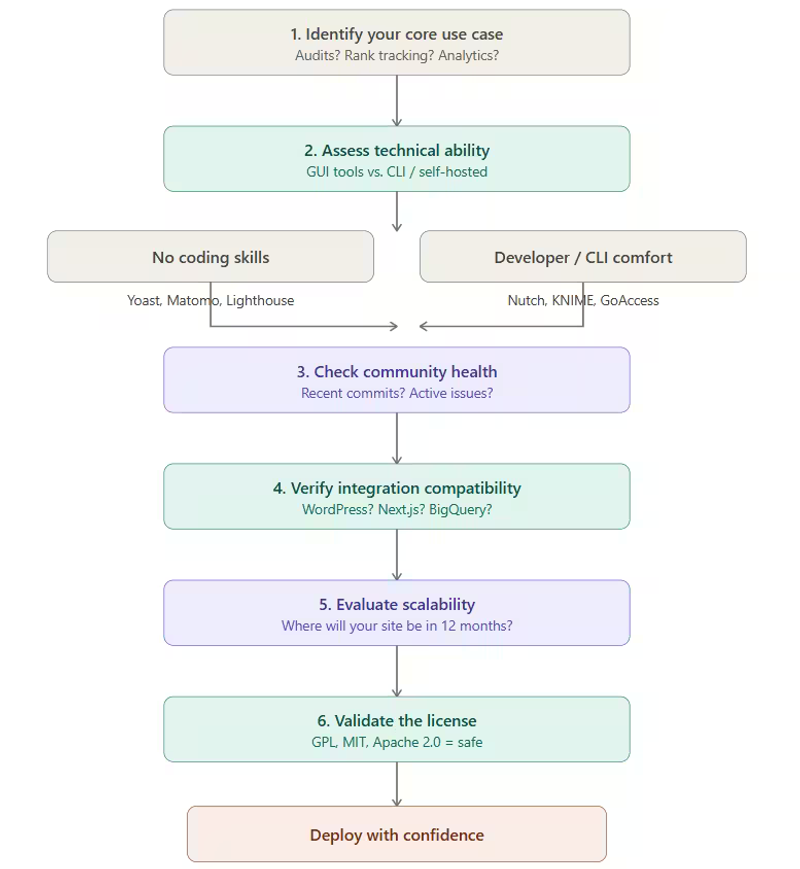
Picking the wrong tool wastes more time than not using one at all. We've watched teams spend weeks setting up Apache Nutch for a 200-page blog — a job Screaming Frog handles in 3 minutes.
The right choice depends on 6 factors, and we recommend working through them in this order.
Start with your core use case:
Don't try to build a full stack on day one. If your rankings are dropping, start with Serposcope.
If your site speed is tanking, start with Lighthouse. Solve the most urgent problem first, then expand. In our experience, 90% of teams only need 2–3 tools to cover their daily workflow.
Be honest about your technical ability:
Yoast SEO requires zero coding — you install it and it works. KNIME needs workflow-building skills. Apache Nutch needs Java and Hadoop familiarity.
If nobody on your team is comfortable with a terminal, stick to GUI-based tools first. We've seen agencies abandon perfectly good tools simply because they overestimated their team's technical capacity during evaluation.
Check community health before committing:
A tool with 5,000 GitHub stars but no commits in 18 months is effectively abandoned. Look for recent commit activity (within the last 3–6 months), open issue response times, and an active forum or Discord.
Serposcope and Matomo both have healthy communities. We always check the GitHub pulse page before recommending any tool to clients.
Verify integration compatibility:
If your site runs on Next.js, Yoast SEO is useless — you need Next SEO instead. If your analytics stack is built around Google BigQuery, check whether the tool exports data in a compatible format.
We lost two days in 2022 trying to pipe SEO Panel data into a client's existing Looker dashboard before realizing the export format didn't match.
Evaluate scalability early:
SerpBear is perfect for 300 keywords. At 3,000 keywords, it struggles — Serposcope handles that load comfortably.
Think about where your site will be in 12 months, not just today.
Validate the license:
GPL, MIT, and Apache 2.0 are all commercially safe. But some tools use AGPL or custom licenses that restrict resale or white-labeling — critical if you're an agency building client-facing dashboards.
Limitations of open source SEO tools
We'd be doing you a disservice if we painted open source as a perfect replacement for paid tools. After 6 years of running these tools across client projects and our own sites, here's where they genuinely fall short.
The setup tax is real
Installing Serposcope takes 20 minutes if you know your way around a server. If you don't, it can take an entire afternoon — plus troubleshooting Java dependencies, configuring proxies, and setting up cron jobs.
Ahrefs, by comparison, takes 30 seconds to sign up. We estimate the average non-developer spends 3–5x longer getting open source tools operational compared to SaaS alternatives.
That upfront time investment is the single biggest barrier we see with clients who attempt the switch.
No dedicated support means you're on your own
When Screaming Frog's paid version breaks, you email their support team and get a fix within 24–48 hours.
When Serposcope throws an error at 2 AM before a client report is due, you're searching GitHub issues and Stack Overflow threads hoping someone else had the same problem.
We've lost hours to debugging issues that a paid support ticket would have resolved in minutes. For small teams without a developer on staff, this is a serious consideration.
Link data can't compete with commercial indexes.
This is the hardest truth. Ahrefs reportedly crawls over 8 billion pages daily and maintains an index of 35+ trillion links.
No open source tool comes close. OpenLinkProfiler is useful for basic checks, but for deep competitive backlink analysis — finding link gaps, analyzing anchor text distributions at scale, identifying toxic link patterns across thousands of referring domains — paid tools still win by a wide margin.
If backlink strategy is your primary focus, budget for at least one commercial tool alongside your open source stack.
Maintenance is ongoing
Server updates, security patches, database backups, storage management — self-hosted tools need regular attention. We spend roughly 2–3 hours per month maintaining our open source SEO stack across servers.
That's manageable for us, but for a solo marketer already stretched thin, it adds up. One client abandoned their Matomo installation after six months simply because nobody remembered to update it and the PHP version fell behind.
AI-powered features are mostly absent
Modern paid tools are shipping AI-driven content optimization, predictive rank tracking, automated keyword clustering, and natural language processing for search intent analysis. Most open source SEO tools haven't caught up.
KNIME supports machine learning workflows, but building those pipelines yourself is a far cry from clicking a button in Surfer SEO or Clearscope. If AI-assisted content optimization is central to your workflow, open source tools will leave a noticeable gap.
Data freshness varies wildly
Paid tools update their databases daily or even hourly. Open source tools depend on when you run crawls, how frequently your server pulls rank data, and whether external data sources (like OpenLinkProfiler's index) are current.
We've encountered situations where rank tracking data was 48 hours stale because a cron job silently failed — something that simply doesn't happen with managed SaaS platforms.
None of this means open source isn't worth it
It means you should go in with realistic expectations. The savings are substantial — we estimate $4,000–$8,000 per year for a typical agency that replaces 3–4 paid subscriptions with self-hosted alternatives.
But those savings come with trade-offs in time, technical overhead, and certain capability gaps that paid tools still own.
Final verdict
Open source SEO tools aren't a gimmick and they aren't a compromise. For rank tracking, technical auditing, website analytics, and on-page optimization, the best open source options deliver 80–90% of what paid tools offer at a fraction of the cost.
Serposcope tracks keywords as accurately as Ahrefs for our use cases. Matomo gives us cleaner, more privacy-compliant analytics than GA4. Screaming Frog's free version handles the majority of our site audits without us spending a penny.
The remaining 10–20% gap — mainly in backlink data depth, AI features, and out-of-the-box convenience — is real but narrowing. The open source SEO ecosystem in 2026 is dramatically stronger than it was even two years ago.
Tools like LibreCrawl and SerpBear didn't exist when we started, and KNIME's SEO automation capabilities have matured significantly.
So, our recommendation is straightforward. Start with two tools that solve your most pressing problem today. For most teams, that's Matomo for analytics and Serposcope for rank tracking — combined annual cost under $100 in hosting versus $2,400+ for equivalent paid subscriptions.
Get comfortable, then layer in Screaming Frog for audits, Yoast for on-page, and OpenLinkProfiler for backlink checks. Within a month, you'll have a functional SEO stack that costs less than a single month of most premium tools.
The money you save goes straight back into what actually moves rankings — better content, stronger links, and faster sites. That's the real advantage open source gives you.
Frequently Asked Questions
Everything you need to know about this topic.
Yes. The software itself costs nothing. Your only expense is hosting — typically $5–$10/month for a VPS. That's roughly 90–95% cheaper than paid SEO subscriptions like Ahrefs ($99/month) or SEMrush ($130/month).
For rank tracking, technical audits, and analytics — yes. Tools like Serposcope, Screaming Frog, and Matomo cover 80–90% of those use cases. The gap remains in backlink database depth and AI-powered features where paid tools still lead.
Not always. Yoast SEO, Google Lighthouse, and OpenLinkProfiler require zero coding. Tools like Apache Nutch, KNIME, and GoAccess need developer-level comfort with terminals and server configuration.
Matomo for analytics and Yoast SEO for on-page optimization. Both install in minutes, have clean interfaces, and require no technical background. Together they cover the two most common SEO needs for new websites.
Self-hosted tools like Matomo are generally better for GDPR than cloud-based alternatives because you control where data is stored. No visitor information leaves your server, eliminating third-party data sharing concerns.
Serposcope for large-scale tracking (unlimited keywords, 2,400+ across 14 sites on one $8/month VPS). SerpBear for smaller setups under 500 keywords where a cleaner, modern interface matters more.
Yes — most professionals build a stack of 3–5 tools. A common combination is Matomo (analytics) + Serposcope (rank tracking) + Screaming Frog (audits) + Yoast SEO (on-page) + OpenLinkProfiler (backlinks), all running under $100/year total.
Steeper setup time, no dedicated support (community-only), smaller backlink databases compared to Ahrefs or Moz, ongoing server maintenance, and most lack AI-driven features found in modern paid tools.
Free tools like Ahrefs Webmaster Tools have usage limits and proprietary closed code. Open source means the full source code is public — you can inspect, modify, self-host, and customize it with no restrictions or surprise paywalls.
Approximately $60–$120/year in VPS hosting. That covers Matomo, Serposcope, SEO Panel, and other self-hosted tools running on a single server. The equivalent paid tool subscriptions would cost $2,400–$6,000/year.
Written By
Want help getting your brand ranked on Google and cited by AI?
We help businesses build AI visibility through SEO, content, and authority with clear revenue impact.
Book a Strategy Call