
Google now answers queries before users click a link, with 58.5% of US searches ending without a click.
At the same time, AI Overviews, ChatGPT, and Perplexity are pulling traffic away from websites.
So, in this guide, I explain how to use AI to improve your SEO workflows without scaling your team and get your content cited in AI-driven search results.
- AI SEO works in two directions: using AI tools to speed up your SEO work, and optimizing your content so AI search engines cite it.
- AI Overviews now trigger on ~13% of Google searches — up from 6.49% in January 2025.
- 60% of marketers already use AI for keyword research. 48% use it for content ideation (Semrush survey, 2025).
- You can use AI across keyword research, on-page SEO, technical audits, content creation, and competitor analysis.
- AI-generated content works when a human reviews it for accuracy, adds original insights, and matches brand voice.
- Costs range from $0 (ChatGPT free) to $1,000+/month for enterprise SEO platforms.
- Structured data, E-E-A-T signals, and entity clarity help your content appear in AI-generated answers.
- The goal has shifted. Ranking on page one still matters. But getting cited by AI systems is now equally important for driving inbound leads.
What is AI SEO?
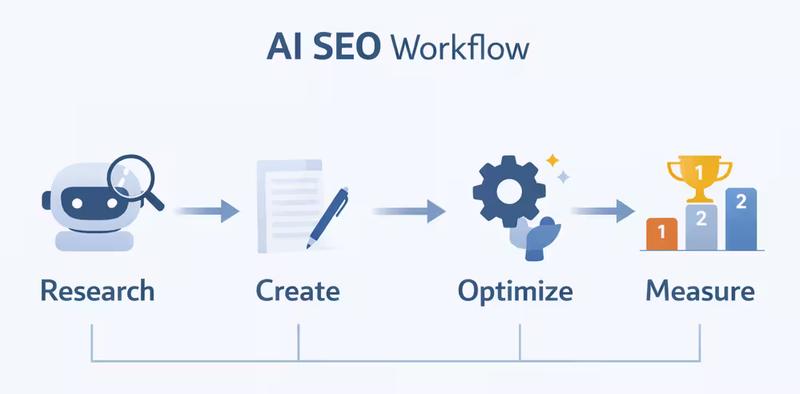
AI SEO is the practice of using artificial intelligence to improve your SEO workflows — and optimizing your content so AI-powered search platforms can find, understand, and cite it.
Think of it as two sides of the same coin.
Side one: You use AI tools like ChatGPT, Claude, or Semrush to do keyword research faster, draft content, run technical audits, and analyze data. The tools handle the heavy lifting. You focus on strategy.
Side two: You optimize your content so AI systems like Google AI Overviews, ChatGPT with browsing, Perplexity, and Gemini can pull information from your pages and present it to users.
That second part is what makes AI SEO different from traditional SEO.
With traditional SEO, the goal is simple: rank higher in Google's organic results and earn clicks.
With AI SEO, ranking still matters. But you also want your content to be the source AI systems cite when they generate answers.
Because if an AI tool answers a question using your data, your brand gets visibility — even when the user never visits a search engine results page.
| Traditional SEO | AI SEO | |
|---|---|---|
| Primary goal | Rank in organic search results | Rank in search results + get cited in AI-generated answers |
| Optimized for | Google's ranking algorithm | Google's algorithm + LLMs (ChatGPT, Gemini, Perplexity) |
| Content focus | Keywords, backlinks, on-page elements | Entity clarity, structured data, extractable passages |
| Success metric | Rankings, organic traffic, CTR | Rankings, traffic, AI citations, brand mentions in LLM responses |
| Search behavior | User clicks a link from the SERP | User gets an AI-generated answer that may or may not include a link |
And, this shift is already measurable.
AI Overviews now appear in roughly 13% of Google searches as of March 2025. That number was 6.49% just two months earlier.
And Gartner predicts traditional search volume will drop 25% by 2026 because of AI assistants and virtual agents.
So the audience is already moving. Your SEO approach needs to move with them.
The Key Sub-Disciplines Inside AI SEO
AI SEO is an umbrella term. Under it, you'll see a few related concepts that keep showing up in industry discussions.
Here's what each one means and how they connect:
Generative Engine Optimization (GEO)
GEO focuses on getting your content featured inside AI-generated answers (Google AI Overviews, Bing Copilot responses, or Perplexity summaries).
The idea is straightforward. When an AI system generates an answer, it pulls from sources it considers accurate, well-structured, and trustworthy. GEO is the process of making your content one of those sources.
This means writing clear, self-contained passages. Using question-and-answer formats. Including specific data points. And structuring your pages so AI models can extract information without needing the surrounding context.
According to BrightEdge research, pages that directly address specific queries see 31% higher citation rates in AI-generated results.
Answer Engine Optimization (AEO)
AEO has been around longer than GEO. It started with featured snippets and voice search.
The core idea: structure your content to directly answer questions. FAQ sections, definition blocks, concise how-to steps — all of these help search engines (and now AI systems) pull quick answers from your page.
If GEO is about getting cited in AI-generated summaries, AEO is about making your content easy to extract in the first place.
LLM Optimization (LLMO)
LLMO is about making your brand part of what large language models like ChatGPT, Claude, and Gemini actually know and reference.
This goes deeper than ranking or snippets. It's about whether an AI model considers your brand a reliable source when it generates a response about your industry.
LLMO involves building consistent entity information across your website and third-party sources, publishing original research that models can reference, and maintaining a strong presence on platforms AI systems frequently crawl — like Reddit, Wikipedia, and authoritative industry publications.
How they all fit together:
- Traditional SEO gets you ranked.
- AEO gets your content extracted as a direct answer.
- GEO gets your content cited in AI-generated summaries.
- LLMO gets your brand embedded in what AI models consider trustworthy.
AI SEO ties all four together into a single approach. You don't pick one. You build a foundation that serves all of them. So, now, before diving into how to use AI in SEO, let's see...
How AI is Changing SEO
Google in 2016 and Google in 2026 are two very different search engines.
A decade ago, Google matched keywords in your query to keywords on a webpage. If your page had the right words in the right places and enough backlinks, you ranked.
That model is mostly gone now. Here's what replaced it — and why it matters for your inbound lead strategy.
From keyword matching to understanding language
Google has been layering AI into its core search algorithm for years. Each update pushed the system further away from literal keyword matching and closer to understanding what a searcher actually means.
The pattern is clear. Each update made Google better at understanding intent and worse at rewarding pages that only optimized for specific keyword strings.
For example, when someone searches "apple nutrition," Google now understands they're asking about the fruit — not about Apple Inc. It uses context, not just the word, to decide what result to show.
For SEO teams, this means your content needs to answer the question behind the query — not just contain the words in the query.
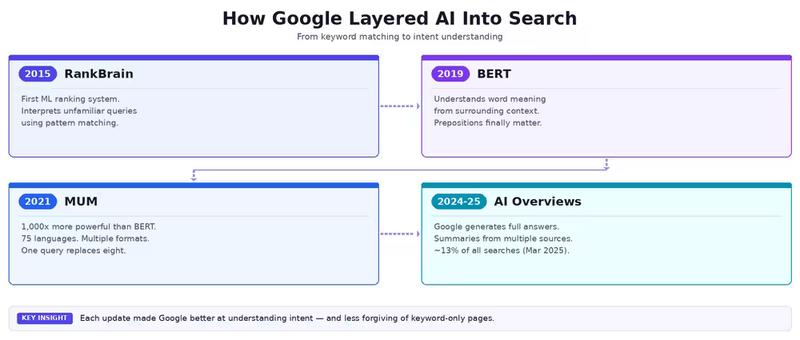
How People Actually Search Now
The way users interact with search has changed alongside these algorithm updates.
Here's what we see across our client accounts and what the data confirms:
Queries are getting longer and more conversational. People type (and speak) full questions now.
Phrases like "what's the best CRM for a 10-person sales team that integrates with Slack" are normal.
According to Google, 15% of daily searches are queries Google has never seen before. AI systems handle these well. Keyword-stuffed pages don't.
Users expect answers, not just links. Featured snippets trained people to look for direct answers at the top of the page.
AI Overviews took that further. Now a significant chunk of searchers get what they need without scrolling past the first result — or clicking anything at all.
Search is happening outside Google. ChatGPT hit 200 million weekly active users by late 2024. Perplexity processes millions of queries daily.
These platforms don't show ten blue links. They generate a single synthesized answer and cite their sources in-line.
So, if your content is one of those sources, you get brand visibility. If it's not, your competitors do.
What this means for inbound lead generation
These changes hit inbound teams in specific ways.
Top-of-funnel content gets less click traffic. Informational queries — the blog posts that typically drive awareness — are the most affected by AI-generated answers.
The user gets their answer in the AI Overview and moves on. Your page might be the cited source, but the click never happens.
Mid-funnel and bottom-funnel content holds stronger. Queries with commercial or transactional intent ("best project management tool for agencies," "CRM pricing comparison") still drive clicks.
People comparing products or ready to buy want more detail than an AI summary provides.
An Amsive study found that branded keywords are less likely to trigger AI Overviews.
And when branded terms do trigger one, those pages see an 18.68% increase in CTR. So brand recognition still pulls people through to your site.
Measurement has to expand. If you only track organic clicks and keyword rankings, you'll miss the full picture.
Your content could be generating brand impressions inside AI answers across Google, ChatGPT, and Perplexity — and none of that shows up in Google Analytics.
SEO teams focused on inbound leads now need to track:
- Traditional keyword rankings and organic traffic
- AI Overview appearances and citation frequency
- Brand mentions in LLM responses (across ChatGPT, Gemini, Claude, Perplexity)
- Impression share in AI-generated answers, not just SERP positions
The SEO playbook has expanded
The investment in SEO is going up, not down. 90% of surveyed organizations say they plan to prioritize SEO more in the AI era.
And McKinsey projects that generative AI will deliver $460 billion in incremental marketing productivity over the next decade.
We've been doing SEO for clients since 2021. The fundamentals we used then — strong content, clean technical foundations, smart link building — still produce results.
What changed is where those results show up.
Five years ago, a well-optimized page earned its spot in the top ten blue links. Today, that same page needs to earn its spot in AI-generated summaries, chat-based answers, and voice responses too.
The playbook got bigger. The old pages didn't get thrown out.
But the teams that only run the old playbook are watching their share of inbound traffic shrink — even when their rankings look stable.
How to Use AI for SEO: 8 Practical Use Cases
So, now let's see how we can use AI in our SEO workflows. Each use case includes what to do, a prompt you can copy, and which tools work best.
1. Brainstorm Content Ideas and Topic Clusters
Most content calendars stall at the same point: coming up with ideas that connect to real search demand.
AI speeds this up. You give it to your audience, your product, and your funnel stage. It gives you dozens of angles in seconds.
Here's a prompt that works well:
Prompt: "You're an SEO strategist for a [type of company] that sells [product/service]. Generate 15 blog post ideas targeting [specific audience]. Include a mix of top-of-funnel educational posts, mid-funnel comparison posts, and bottom-of-funnel decision-stage posts."
You'll get a raw list like below.
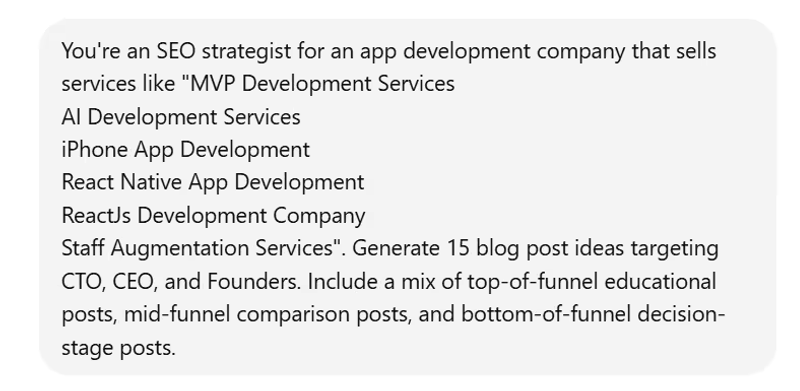
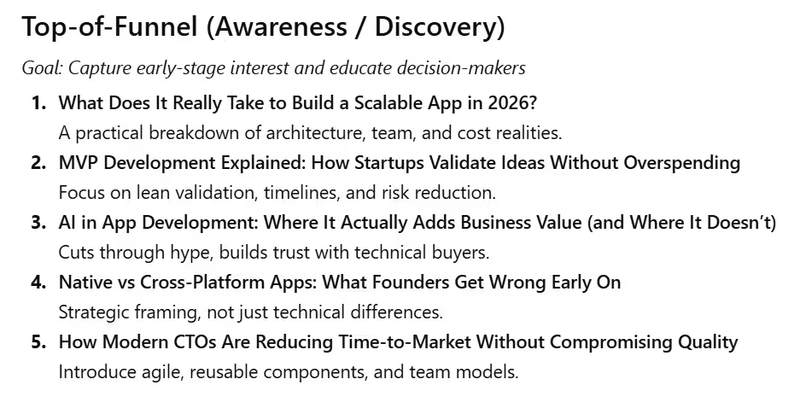
Some ideas will be strong. Others will miss the mark. That's fine.
The next step is to group those ideas into topic clusters — one pillar page covering a broad topic, supported by 5–7 cluster pages that go deeper into subtopics.
For example, if you sell project management software:
| Content Type | Example Topic |
|---|---|
| Pillar page | The Complete Guide to Project Management for Agencies |
| Cluster page | How to Track Billable Hours Across Client Projects |
| Cluster page | Project Management Templates for Marketing Teams |
| Cluster page | Agile vs. Waterfall: Which Works for Small Agencies? |
This structure creates internal linking paths that help Google understand your topical depth. It also gives AI systems a clear map of your expertise on a subject.
Tools: ChatGPT or Claude for brainstorming. Semrush Keyword Strategy Builder to validate clusters with real search volume data.
2. Conduct Keyword Research with AI
60% of marketers already use AI for keyword research, according to a 2025 Semrush survey. It's the most common AI use case in SEO — and for good reason.
AI tools can generate keyword lists in seconds that would take hours to compile manually.
But raw AI keyword suggestions lack data. They don't show search volume, difficulty scores, or intent classifications.
So the workflow looks like this: AI generates ideas. A dedicated SEO tool validates them.
Step 1: Generate seed keywords with AI
Prompt: "Generate 20 long-tail keywords that [target persona] might search when evaluating [your product/service]. Include question-based keywords and commercial-intent terms."
For a CRM company targeting small business owners, you might get:
- "best crm for small business under 50 employees"
- "how to choose a crm for a sales team"
- "crm with email marketing built in"
- "affordable crm for startups"
Step 2: Validate with real data
Paste that list into Semrush Keyword Overview or Ahrefs Keywords Explorer. Check three things:
| What to Check | Why It Matters |
|---|---|
| Search volume | Confirms people actually search for this term |
| Keyword difficulty | Shows how hard it will be to rank |
| Search intent | Tells you what type of content Google expects (informational, commercial, transactional) |
Step 3: Find gaps your competitors own
Use AI to speed up competitive gap analysis:
Prompt: "My website is [your URL]. My top 3 competitors are [competitor URLs]. What keyword themes are they likely covering that I'm missing?"
Then cross-reference the AI output with a Semrush Keyword Gap report to confirm which opportunities are real.
Step 4: Group keywords by intent
Cluster your validated keywords into four buckets:
| Intent Type | Example | Content Format |
|---|---|---|
| Informational | "what is a crm" | Blog post, guide |
| Commercial | "best crm for small business" | Comparison post, listicle |
| Transactional | "hubspot pricing plans" | Product page, landing page |
| Navigational | "salesforce login" | Homepage, branded page |
This grouping tells you what to write and what format to use for each keyword.
3. Perform SERP Analysis and Competitor Research
Before you write anything, look at what already ranks for your target keyword. AI can digest multiple competitor pages at once and identify patterns.
Prompt: "I'm targeting the keyword [keyword]. Here are the top 5 ranking pages: [URL 1] [URL 2] [URL 3] [URL 4] [URL 5]. Analyze them and tell me: (1) What main topics each page covers, (2) Common questions they answer, (3) Content gaps — topics none of them cover well, (4) Average structure and use of visuals."
What to do with the output:
- Build your outline around the topics every competitor covers (table stakes content).
- Add the gaps as unique sections (your competitive advantage).
- Note the format patterns — if every top result uses comparison tables, yours should too.
This takes about 10 minutes with AI. Doing the same analysis manually — opening five tabs, reading each page, taking notes — takes over an hour.
4. Draft and Optimize Content
AI can write a first draft. But first drafts from AI read like first drafts from AI — generic phrasing, no original perspective, and surface-level coverage.
The effective workflow: use AI for structure, use humans for substance.
Here's how to break it down:
Prompt (for outline): "Create a detailed blog post outline for the topic [topic]. Target keyword: [keyword]. Audience: [persona]. Include an intro hook, H2/H3 heading structure, and a suggested word count for each section."
Prompt (for section drafts): "Write the section under the heading [heading]. Keep the tone conversational and direct. Use short paragraphs. Include one specific example. Target length: 200 words."
Writing section by section gives you more control over quality than asking for a full article at once.
After the AI draft is ready, a human editor needs to:
- Add first-hand experience and original data points
- Rewrite any sentences that sound templated
- Verify every fact, statistic, and claim
- Adjust the tone to match your brand voice
Tools: ChatGPT and Claude for drafting. Semrush AI Article Generator for drafts that include real-time SERP data. Jasper for teams that need brand voice consistency at scale.
5. Generate Meta Tags and FAQs
Writing title tags and meta descriptions for hundreds of pages is repetitive work. AI handles it well.
For title tags:
Prompt: "Write 5 title tag variations for a blog post about [topic]. Target keyword: [keyword]. Keep each under 60 characters. Make them specific and click-worthy."
For meta descriptions:
Prompt: "Write 3 meta description options for a page about [topic]. Target keyword: [keyword]. Keep each under 155 characters. Include a clear benefit or value statement."
For FAQ sections:
Prompt: "Generate 6 frequently asked questions about [topic] that a [target persona] would realistically search on Google. Write concise 2-3 sentence answers for each."
FAQ sections are worth extra attention. They target People Also Ask boxes in Google results.
They give AI systems ready-made question-answer pairs to cite. And they add topical depth to your page without inflating the word count.
6. Optimize Content with Secondary Keywords
Your primary keyword gets you in the game. Secondary keywords — semantically related terms — help search engines understand the full scope of your content.
AI can weave these into an existing draft without changing the tone.
Prompt: "Here is my draft about [topic]: [paste draft]. Naturally insert these secondary keywords where they fit: [keyword list]. Maintain the current tone and flow. Highlight where you made changes."
You can also ask AI to suggest placements instead of making the edits directly:
Prompt: "Review this draft and suggest where I could naturally add these secondary keywords: [keyword list]. For each suggestion, explain why that placement works."
This second approach works better when you want to stay in control of the final copy.
Tool: Semrush SEO Writing Assistant scores your content in real time against top-ranking competitors. It flags missing secondary keywords, readability issues, and tone inconsistencies as you write.
7. Run Technical SEO Audits
Technical problems can block your pages from ranking — even if the content is strong. Broken links, slow load times, missing schema markup, and crawl errors all hurt performance.
AI-powered crawlers can scan your entire site and flag issues in minutes.
| Tool | What It Does |
|---|---|
| Screaming Frog | Crawls your site and exports detailed technical data — broken links, redirect chains, duplicate titles, missing alt text |
| Sitebulb | Visual site audits with prioritized recommendations. Flags issues by impact level |
| Lumar | Enterprise-level crawler for large sites. Monitors technical health over time |
| AIOSEO | WordPress plugin that automates schema markup, meta tags, and on-page checks |
Where AI adds value beyond crawling: you can paste a Screaming Frog export into ChatGPT and ask it to prioritize fixes.
Prompt: "Here's a CSV export from a technical SEO audit. Categorize the issues by severity (critical, high, medium, low). For each critical issue, suggest a specific fix and explain the SEO impact."
This turns a raw spreadsheet into an action plan your team (or your client) can follow.
8. Analyze SEO Data and Reporting
Google Search Console and GA4 hold a lot of data. Spotting the patterns that matter inside a spreadsheet with 10,000 rows takes time.
AI compresses that process.
Prompt: "Here's a Google Search Console export for the last 90 days [paste or upload CSV]. Identify: (1) Keywords where impressions are high but CTR is below 2%, (2) Pages that lost the most clicks month-over-month, (3) Any queries where average position improved but clicks dropped. Suggest 3 actions based on what you find."
You can also use AI to turn raw data into client-ready language:
Prompt: "Summarize these SEO performance metrics in 4 bullet points for a client report. Use plain language. Highlight wins first, then areas to improve."
One important note: AI interprets data patterns. It can misread seasonal trends as performance drops.
It can overweight small sample sizes. So, always cross-check what AI tells you against what you know about the account, the industry, and any recent changes you made.
How to Use AI for On-Page SEO
The cases above cover the full SEO workflow. Now let's zoom in on on-page optimization — the specific elements on each page that influence how Google (and AI systems) evaluate your content.
AI can handle much of the on-page work that used to be manual. Here are five areas where it makes the biggest difference.
Audit and Improve Your Heading Structure
A clean heading hierarchy — one H1, followed by H2s for main sections, H3s for subtopics — helps search engines understand the organization of your page.
It also helps AI models identify which passage answers which question.
AI can audit an existing page and spot structural problems fast.
Prompt: "Here's the heading structure from my blog post: [paste all H1, H2, H3 tags]. Identify any issues — missing hierarchy levels, vague headings, or headings that don't reflect the content beneath them. Suggest improved versions that include relevant keywords naturally."
Common issues AI catches: multiple H1 tags on a single page, H3s used without a parent H2, and headings that are too generic (like "Overview" or "Details") to signal topic relevance.
Improve Readability and Semantic Depth
Google measures how well your content matches the depth of coverage that top-ranking pages provide.
If competing pages cover seven subtopics and yours covers three, that gap shows.
AI tools can compare your draft against top results and flag what's missing.
Prompt: "Compare my draft about [topic] to the top 5 ranking pages for the keyword [keyword]. Identify semantic gaps — related concepts, terms, or subtopics that competitors cover but my draft doesn't."
Tools: Surfer SEO and Clearscope score your content against top-ranking pages in real time. They highlight missing related terms and grade overall content depth. Semrush SEO Writing Assistant provides similar scoring inside Google Docs or WordPress.
Build Smarter Internal Links
Internal links distribute authority across your site and guide both users and crawlers to related content. Most sites under-link. Pages that should connect to each other sit isolated.
AI can scan your existing content and find linking opportunities you've missed.
Prompt: "Here's a list of blog posts on my site: [paste titles and URLs]. I just published a new post about [topic]. Suggest 5–8 internal links — older posts that should link to this new one, and places in the new post where I should link out to existing content. Explain why each link makes sense."
This works especially well for sites with 50+ published articles where manual cross-referencing takes too long.
Generate Image Alt Text at Scale
Alt text serves two purposes: accessibility for screen readers, and context for search engines. Most sites either skip alt text entirely or fill it with generic descriptions like "image1.jpg."
AI can write descriptive, keyword-relevant alt text for every image on your page.
Prompt: "Here are 8 images from my blog post about [topic]. For each image, write alt text that: (1) describes what the image shows, (2) includes a relevant keyword where natural, (3) stays under 125 characters."
If your site runs on WordPress, plugins like AIOSEO can generate alt text automatically using AI — useful for sites with hundreds of untagged images.
Generate Schema Markup
Schema markup gives search engines explicit context about your content. It's what powers rich results — star ratings, FAQ dropdowns, how-to steps, and product details in search results.
Most SEO teams know schema matters. Few have time to write JSON-LD by hand for every page.
AI solves that.
Prompt: "Generate FAQ schema markup in JSON-LD format for these 5 questions and answers: [paste Q&A pairs]. Follow Google's structured data guidelines."
You can do the same for Article schema, HowTo schema, Product schema, and more. After generating, validate the output using Google's Rich Results Test before adding it to your page.
| Schema Type | Best For | Rich Result It Powers |
|---|---|---|
| FAQPage | Blog posts with FAQ sections | FAQ dropdown in search results |
| HowTo | Step-by-step guides | Step-by-step visual in SERPs |
| Article | Blog posts, news articles | Enhanced listing with author, date |
| Product | E-commerce product pages | Price, rating, availability in SERPs |
| LocalBusiness | Service-area businesses | Knowledge panel, map results |
Schema also helps AI systems parse your content more accurately.
Pages with structured data give AI Overviews and LLMs clear signals about what each section of your page covers — which increases your chances of being cited.
Benefits, Challenges, and Costs of AI SEO
AI tools can transform your SEO output.
But they come with tradeoffs. So, now I break down what you gain, what to watch out for, and what you'll spend.
Benefits
You move faster:
Keyword research that used to take a full afternoon now takes 30 minutes. SERP analysis that required opening 10 tabs and reading each page can happen inside a single AI prompt. That time compounds.
Over a quarter, a two-person SEO team using AI effectively can produce the output of a team twice its size.
You catch patterns humans miss:
AI can process thousands of data points at once — ranking fluctuations across 500 keywords, internal linking gaps across 200 pages, or content overlap between your site and three competitors.
Spotting those patterns manually is possible. But it takes significantly longer and is more prone to oversight.
You scale without scaling headcount:
The 2025 Semrush survey found that 48% of marketers use AI to brainstorm content ideas.
38% use it to build content briefs and outlines. 34% use it to refresh existing content.
Each of these tasks used to require dedicated hours from a strategist or writer. AI handles the first pass. Your team handles the refinement.
You maintain consistency across large sites:
When you're managing 100+ pages, quality drifts. Some pages have strong meta descriptions.
Others have none. Some follow your heading structure guidelines.
Others don't.
AI can audit every page against the same standards and flag inconsistencies — something no human team can do as reliably at that volume.
Challenges
AI makes things up.
This is the biggest risk. AI tools can generate statistics that don't exist, cite sources that were never published, and present opinions as facts.
Every claim in an AI draft needs human verification. If a fabricated stat makes it onto your site, it damages your credibility — and your E-E-A-T signals.
The output sounds the same:
Without strong prompts and editing, AI-generated content falls into predictable patterns — same sentence structures, same transitions, same surface-level insights.
Google's helpful content system evaluates whether content provides original value. If your page reads like a rewritten version of what already exists, it won't perform well.
Overautomation leads to decay:
Publishing AI content on autopilot — without reviewing performance, updating outdated sections, or adjusting strategy — creates a content library that ages fast.
Search algorithms evolve. Competitors publish new pages. What ranked six months ago may not hold its position without maintenance.
Data privacy requires attention:
When you paste client data, internal analytics, or proprietary research into an AI tool, that information may be processed or stored by the provider.
Enterprise teams need clear policies on what data can and can't be shared with third-party AI platforms.
Tools like BrightEdge DataMind address this by using keyword data instead of user data to train their models.
You still need domain expertise:
AI can draft a blog post about enterprise CRM selection.
But it can't tell you which objections your sales team hears most often, what onboarding questions new customers ask in their first week, or which competitor feature comparison matters most to your buyer.
That knowledge comes from experience — and it's what separates content that ranks from content that converts.
Costs
AI SEO tools range from free to enterprise-level pricing. Here's what you can expect across different budgets:
| Tool | Monthly Cost | What You Get |
|---|---|---|
| ChatGPT Free | $0 | Basic prompting, brainstorming, short drafts. Can use GPT-5 but with usage caps |
| ChatGPT Plus | $20/mo | Access to GPT-5 and newer models, file uploads, image generation, longer context windows |
| Claude Pro | $20/mo | Long-context analysis, large document processing, strong for editing and data work |
| Surfer SEO | $99/mo | On-page content scoring, SERP analysis, content editor with real-time optimization |
| Semrush | Pro$139.95/mo | Keyword research, site audit, position tracking, SEO Writing Assistant, AI Article Generator |
| Ahrefs Standard | $249/mo | Backlink analysis, keyword explorer, content gap reports, rank tracking |
| Jasper Business | $69/mo per seat | AI writing with brand voice controls, campaign workflows, team collaboration |
| BrightEdge / Conductor | $1,000+/mo | Enterprise AI-driven SEO platforms with automated optimization, reporting, and data insights |
Prices reflect publicly listed rates as of early 2026. Check each provider's website for current pricing.
A few notes on spending wisely:
Start with one general-purpose AI tool and one SEO-specific tool. ChatGPT Plus ($20/mo) paired with Semrush Pro ($139.95/mo) covers keyword research, content drafting, technical audits, and performance tracking. That's a strong starting stack for under $160/month.
Measure ROI in hours saved, not just rankings gained. If AI cuts your keyword research time from 3 hours to 30 minutes per project, and you run 8 projects a month, that's 20 hours reclaimed. At an SEO specialist's hourly rate, that time has a clear dollar value.
Free tiers have limits that matter. ChatGPT's free version works for basic brainstorming.
But it lacks file upload, advanced reasoning, and the context window size needed to analyze full articles or large data exports. If you're using AI for anything beyond casual prompts, the paid tier pays for itself quickly.
Otherwise, you can also check our comprehensive list of the best open source SEO tools.
Conclusion
Your pages now compete for visibility across Google's organic listings, AI Overviews, ChatGPT responses, and Perplexity summaries. Winning in one of those places is good. Showing up across all of them is how you build a steady pipeline of inbound leads.
So, if you haven't started using AI in your SEO workflow, pick one use case. Keyword research is the easiest entry point — it's where most marketers begin, and the results are immediate. Run your first AI-assisted keyword session, validate the output with a tool like Semrush or Ahrefs, and publish one piece of content built from that process.
Once you see the time savings firsthand, expanding to content drafting, technical audits, and on-page optimization becomes a natural next step.
Start with one workflow. Measure what changes. Then scale from there.
Frequently Asked Questions
Everything you need to know about this topic.
AI SEO is using artificial intelligence tools to improve SEO tasks like keyword research and content optimization, while also making your content discoverable and citable by AI-powered search engines like Google AI Overviews and ChatGPT.
Traditional SEO optimizes pages to rank in Google's organic results. AI SEO does that too, but also focuses on structuring content so AI platforms can extract, summarize, and cite it in generated answers.
Yes. ChatGPT can help with keyword brainstorming, content drafts, meta tag writing, internal link suggestions, and data analysis. But it lacks real-time search data, so pair it with a dedicated SEO tool like Semrush or Ahrefs for validation.
No. AI automates repetitive tasks like keyword lists and first drafts. But strategy, brand voice, original insights, and quality judgment still require human expertise. AI handles the production. Humans handle the decisions.
Rank in the top 10 organically first. Then structure your content with clear headings, concise answer blocks, and schema markup. Pages with strong E-E-A-T signals and direct answers to specific queries are cited most often.
It depends on the task. ChatGPT and Claude work well for drafting and analysis. Semrush and Ahrefs handle keyword research and technical audits. Surfer SEO and Clearscope score on-page content. Most teams use a combination.
Google does not penalize content for being AI-generated. It penalizes content that is unhelpful, inaccurate, or spammy — regardless of how it was created. AI drafts work well when a human reviews, edits, and adds original value.
Start by prompting ChatGPT to generate long-tail keyword ideas for your audience. Then validate those keywords in Semrush or Ahrefs for search volume, difficulty, and intent. Group the validated terms by topic cluster and search intent before creating content.
Yes. AI-powered crawlers like Screaming Frog and Sitebulb identify broken links, missing schema, slow pages, and crawl errors. You can also paste audit exports into ChatGPT to prioritize fixes by severity and SEO impact.
Track traditional metrics like rankings and organic traffic. Then add AI-specific metrics: AI Overview appearances, citation frequency, and brand mentions in LLM responses across ChatGPT, Gemini, and Perplexity.
Use AI for outlines, first drafts, and repetitive tasks like meta descriptions. But add human editing for accuracy, brand voice, and original experience. The strongest content combines AI speed with human depth.
Written By
Want help getting your brand ranked on Google and cited by AI?
We help businesses build AI visibility through SEO, content, and authority with clear revenue impact.
Book a Strategy Call